Introduction to Lists مقدمة في هياكل البيانات: القوائم (Lists)
Learning Outcomes مخرجات التعلم
- Create lists to store multiple related data items in a single variable.
- Retrieve specific elements from a list using zero-based index numbers.
- Modify existing elements within a list by reassignment.
- Iterate through all items in a list efficiently using a 'for' loop.
- إنشاء القوائم لتخزين بيانات متعددة ومترابطة في متغير واحد.
- استرجاع عناصر محددة من القائمة باستخدام أرقام الفهرسة الصفرية (Zero-Based Indexing).
- تعديل عناصر القائمة الموجودة من خلال إعادة تخصيص قيم جديدة لها.
- التكرار عبر عناصر القائمة بكفاءة وسهولة باستخدام حلقة 'for'.
1. Storing Collections of Data in Lists
Until now, each variable we created could only hold a single value (like one number or one string).
If we wanted to store ten student names, we would have to create ten separate variables. This is where
**lists** come in handy. A list is a collection of ordered items stored within a single variable name,
separated by commas and enclosed in square brackets [].
# Creating lists of different types
fruits = ["apple", "banana", "cherry"]
scores = [85, 92, 78, 90]
mixed = ["Alice", 25, True] # Python lists can store multiple data typesIndex: An integer representing the specific position of an element in a list, starting at
0.
2. Accessing Elements with Zero-Based Indices
Every item in a list has a position number called an **index**. Python uses **zero-based indexing**,
meaning the first element is at index 0, the second is at index 1, and so
on. If you try to access an index that doesn't exist, Python will raise an IndexError.
Python also supports **negative indexing** to access items starting from the end of the list. Index
-1 refers to the last item, -2 refers to the second-to-last item, and so on.
colors = ["red", "green", "blue"]
print(colors[0])  # Outputs: red
print(colors[-1]) # Outputs: blue (Last item)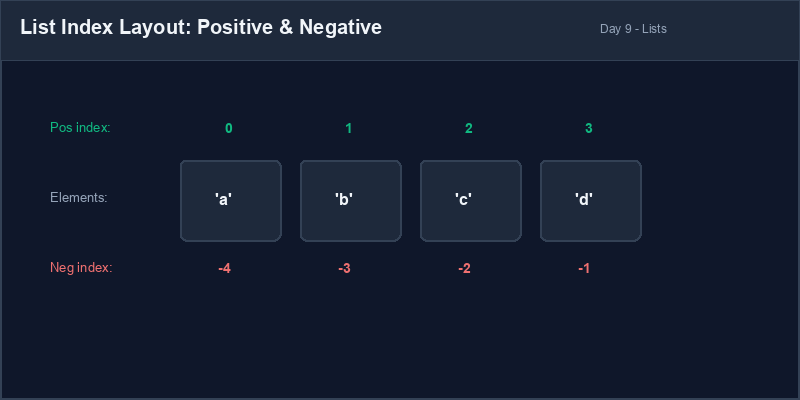
3. Modifying Elements in a List
Lists in Python are **mutable**, which means their elements can be modified after the list is
created. We can update an item by assigning a new value to a specific index address using the
assignment operator (=).
languages = ["Java", "HTML", "C++"]
# Replace Java with Python at index 0
languages[0] = "Python"
print(languages) # Outputs: ['Python', 'HTML', 'C++']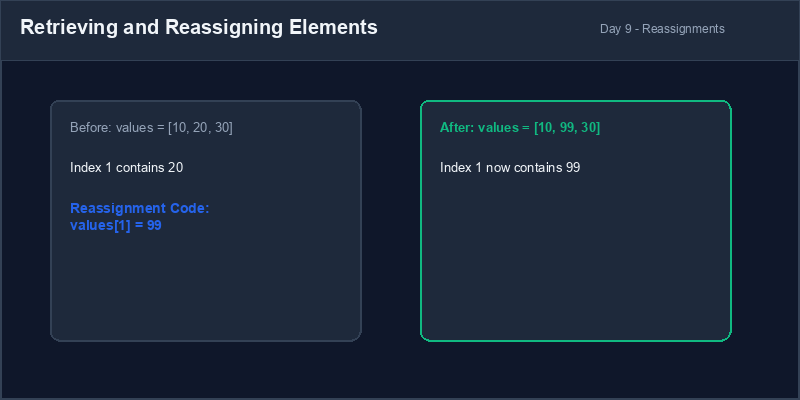
4. Iterating Through Lists with For Loops
A very common pattern is iterating through all elements of a list to inspect or process each item. A
for loop makes this simple: it automatically extracts each element of the list,
one-by-one, and runs the loop body.
# Printing every name
names = ["Alice", "Bob", "Charlie"]
for name in names:
    print(f"Hello, {name}!")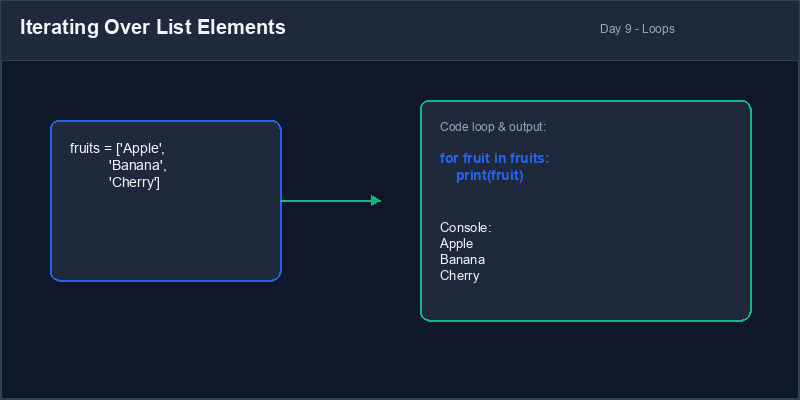
IndexError Warning: Attempting to access an index that is out of range, like
accessing index 3 on a list of only 3 items (indices 0, 1, 2), will cause a crash:
IndexError: list index out of range.
5. Avoiding Index Out of Range Bugs
Always double check your list lengths before using high positive or low negative index integers.
# List has indices 0, 1, 2
items = ["apple", "pear", "banana"]
print(items[3]) # CRASHES! Index 3 doesn't existitems = ["apple", "pear", "banana"]
# Using len() to check size dynamically
if len(items) > 0:
print(items[-1]) # Safely gets last item ('banana')1. تخزين مجموعات البيانات في القوائم
حتى الآن، كان كل متغير نقوم بإنشائه يحمل قيمة واحدة فقط (مثل رقم واحد أو نص واحد). إذا أردنا تخزين
أسماء عشرة طلاب، فسنضطر لإنشاء عشرة متغيرات مستقلة. هنا تأتي أهمية القوائم (Lists).
القائمة هي حاوية تجمع عناصر متعددة مرتبة تحت اسم متغير واحد، وتفصل بين العناصر بفاصلة وتوضع بين قوسين
مربعين [].
# إنشاء قوائم من أنواع مختلفة
fruits = ["apple", "banana", "cherry"]
scores = [85, 92, 78, 90]
mixed = ["Alice", 25, True] # تدعم قوائم بايثون تخزين أنواع بيانات مختلفة معاًالفهرس أو المؤشر (Index): رقم صحيح يمثل موقع العنصر داخل القائمة، ويبدأ دائماً من الرقم
0.
2. الوصول للعناصر باستخدام الفهرسة الصفرية
كل عنصر في القائمة له موقع محدد برقم يُدعى الفهرس (Index). تستخدم بايثون
الفهرسة الصفرية (Zero-Based Indexing)، مما يعني أن العنصر الأول يقع في الفهرس
0، والعنصر الثاني في الفهرس 1، وهكذا. إذا حاولت الوصول لفهرس غير موجود،
فسيحدث خطأ في التشغيل.
تدعم بايثون أيضاً الفهرسة السالبة للوصول للعناصر بدءاً من نهاية القائمة. يشير الفهرس
-1 إلى العنصر الأخير، و -2 إلى العنصر قبل الأخير، وهكذا.
colors = ["red", "green", "blue"]
print(colors[0])  # المخرج: red
print(colors[-1]) # المخرج: blue (العنصر الأخير)3. تعديل عناصر القائمة
القوائم في بايثون قابلة للتعديل (Mutable)، مما يعني إمكانية تغيير قيم عناصرها بعد
إنشاء القائمة. يمكننا تحديث أي عنصر عن طريق تخصيص قيمة جديدة للفهرس المستهدف باستخدام معامل التخصيص
(=).
languages = ["Java", "HTML", "C++"]
# استبدال Java بـ Python في الفهرس 0
languages[0] = "Python"
print(languages) # المخرج: ['Python', 'HTML', 'C++']4. التكرار عبر القوائم باستخدام حلقات For
من الأساليب الشائعة المرور على جميع عناصر القائمة لفحصها أو معالجتها. تسهل حلقة for هذا
الأمر، حيث تقوم باستخراج كل عنصر من القائمة بالتوالي تلقائياً وتشغيل كتلة الكود الخاصة بها.
# طباعة الأسماء في القائمة
names = ["Alice", "Bob", "Charlie"]
for name in names:
print(f"Hello, {name}!")تحذير خارج النطاق (IndexError): محاولة الوصول لفهرس خارج نطاق القائمة، مثل طلب
الفهرس 3 لقائمة تحتوي على 3 عناصر فقط (فهارسها 0، 1، 2)، ستؤدي لتوقف البرنامج بسبب
IndexError: list index out of range.
5. تجنب أخطاء تجاوز حدود فهارس القوائم
تحقق دائماً من طول القائمة باستخدام الدالة len() قبل طلب عناصر عبر فهارس كبيرة أو سالبة
لتفادي توقف الكود.
# القائمة تحتوي الفهارس 0، 1، 2 فقط
items = ["apple", "pear", "banana"]
print(items[3]) # يتوقف البرنامج! الفهرس 3 غير موجودitems = ["apple", "pear", "banana"]
# استخدام len() للتحقق من الطول ديناميكياً
if len(items) > 0:
print(items[-1]) # يحضر العنصر الأخير ('banana') بأمانShopping List Modifier معدل قائمة التسوق
Write a script to maintain a digital shopping list, retrieve items, and modify them:
- Create a list named
shopping_listcontaining four items: "milk", "eggs", "bread", and "apples". - Print the first item and the last item in the list using positive and negative indices.
- Replace "apples" with "oranges" by assigning the new value to the correct index position.
- Write a
forloop to print each item in the updated shopping list with a bullet point indicator.
اكتب برنامجاً لإدارة قائمة تسوق رقمية واسترجاع عناصرها وتعديلها:
- أنشئ قائمة باسم
shopping_listتحتوي على أربعة عناصر: "milk" و "eggs" و "bread" و "apples". - اطبع العنصر الأول والعنصر الأخير في القائمة باستخدام الفهرس الموجب والسالب.
- استبدل العنصر "apples" بـ "oranges" عن طريق تخصيص القيمة للفهرس الصحيح.
- اكتب حلقة
forلطباعة عناصر قائمة التسوق المحدثة مع إضافة نقطة تعداد (bullet point) بجانب كل عنصر.
Model Answer (Python Code)
الإجابة النموذجية (كود بايثون)
# Step 1: Initialize list
shopping_list = ["milk", "eggs", "bread", "apples"]

# Step 2: Print first and last items
print("First item:", shopping_list[0])
print("Last item:", shopping_list[-1])

# Step 3: Modify the last item (index 3 or -1)
shopping_list[-1] = "oranges"

# Step 4: Iterate and print with bullet points
print("
My Shopping List:")
for item in shopping_list:
    print(f"- {item}")
Run the code above in your Thonny or VS Code IDE. Inspect variable outputs and logic flow to ensure it behaves exactly as described. قم بتشغيل الكود أعلاه في بيئة Thonny أو VS Code. تتبع مخرجات المتغيرات ومسار المنطق للتأكد من عمل الكود بالشكل الصحيح.