Tracing Execution and Debugging تتبع مسار تنفيذ الأكواد وتصحيح الأخطاء
Learning Outcomes مخرجات التعلم
- Trace program execution step-by-step manually to explain output anomalies.
- Use print statements strategically as a debugging tool to inspect variable states.
- Identify logical errors hidden within loop and conditional structures.
- Apply strict debugging discipline to fix broken mini-projects.
- تتبع مسار تنفيذ البرنامج يدوياً خطوة بخطوة للوقوف على أسباب المخرجات غير المتوقعة.
- استخدام جمل الطباعة (print) بشكل استراتيجي كأداة لمراقبة قيم الحالات والمتغيرات.
- تحديد الأخطاء المنطقية (Logical Errors) المخفية في الحلقات والجمل الشرطية.
- تطبيق منهجية صارمة لتصحيح الأخطاء وإصلاح المشاريع المصغرة المتعطلة.
1. Manual Execution Tracing (Dry-Running)
When your code doesn't produce the expected results, do not just make random edits. The most reliable way to find bugs is **manual execution tracing** (also known as "dry-running"). This is the practice of acting like the computer: reading the code line-by-line and recording how variables change state in a **trace table**.
Let's dry-run this simple calculation program:
total = 0
for i in [1, 2, 3]:
    total += i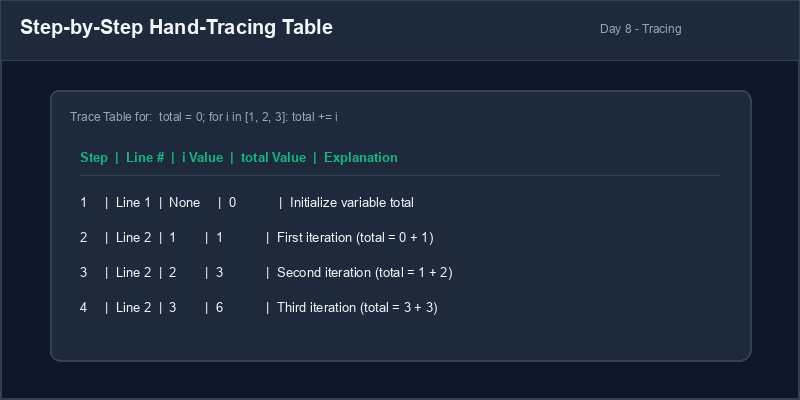
Trace Table: A table grid where columns represent program variables and rows represent each line execution or loop iteration.
2. Strategic Print Statement Placement
A fast way to inspect your program's state at runtime is to insert strategic `print()` statements. By
printing the values of your variables at key checkpoints (such as inside a loop or before an
if branch), you can verify that the values match your expectations.
# Printing checkpoint statements
total = 0
print(f"[DEBUG] Initial total: {total}")
for val in [10, 20]:
    total += val
    print(f"[DEBUG] Add: {val}, Current total: {total}")
print(f"Final Output: {total}")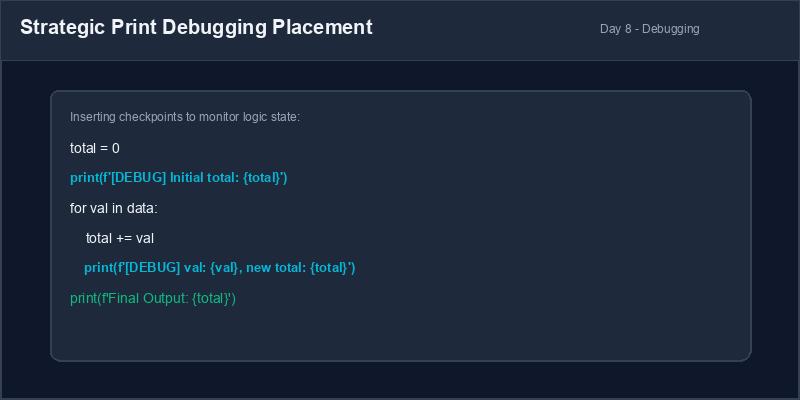
3. Identifying Logical Errors
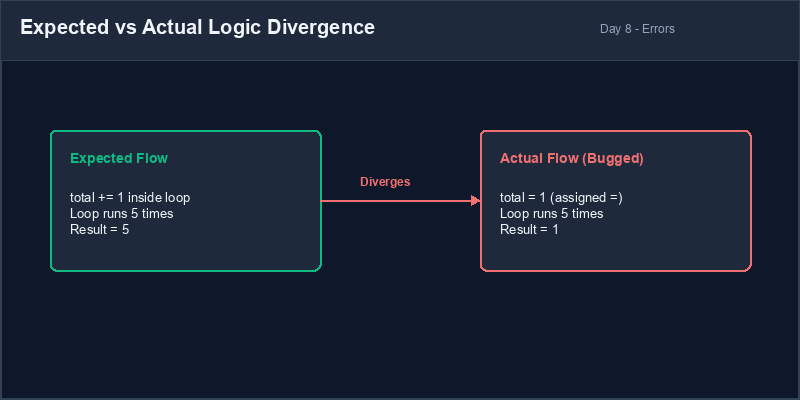
Unlike **syntax errors** (which prevent your program from running), **logical errors** (bugs) occur when the program runs without crashing, but produces incorrect results. These errors are caused by flawed design rules, incorrect conditions, or wrong calculations.
Cleanup Debug Prints: While print debugging is extremely useful, remember to delete or comment out your `[DEBUG]` statements before publishing your final script. This keeps your user-facing console clean.
4. Resolving Assignment vs Addition Logic Bugs
A classic logic bug is resetting a variable inside a loop instead of accumulating values.
# Bug: = instead of += resets the variable every loop
total = 0
for i in [1, 2, 3]:
    total = i # Resets total to i, overwriting previous values!
print(total) # Outputs: 3 (Expected: 6)# Correctly accumulates values
total = 0
for i in [1, 2, 3]:
total += i # Correct addition
print(total) # Outputs: 61. التتبع اليدوي لتنفيذ الأكواد (Dry-Running)
عندما لا يعطي الكود النتيجة المتوقعة، لا تباشر بتعديل الأسطر عشوائياً. الطريقة الأكثر فعالية للعثور على الأخطاء هي التتبع اليدوي للتنفيذ (Dry-Running). وهي محاكاة عمل الكمبيوتر: قراءة الكود سطراً بسطر وتدوين كيفية تغير قيم المتغيرات في جدول التتبع (Trace Table).
لنقم بتتبع هذا البرنامج الحسابي البسيط يدوياً:
total = 0
for i in [1, 2, 3]:
total += iجدول التتبع (Trace Table): جدول تمثل أعمدته متغيرات البرنامج وتمثل أسطره خطوات التنفيذ أو دورات التكرار لتسجيل القيم.
2. استخدام جمل الطباعة الاستراتيجية لمراقبة البيانات
تعتبر إضافة جمل طباعة print() مؤقتة طريقة سريعة لمعاينة حالة برنامجك أثناء التشغيل. من
خلال طباعة قيم المتغيرات في مواقع رئيسية (مثل داخل حلقة التكرار أو قبل جملة if)، يمكنك
التحقق مما إذا كانت القيم تطابق ما خططت له.
# إدراج جمل الطباعة للمراقبة والتتبع
total = 0
print(f"[DEBUG] Initial total: {total}")
for val in [10, 20]:
    total += val
    print(f"[DEBUG] Add: {val}, Current total: {total}")
print(f"Final Output: {total}")3. اكتشاف الأخطاء المنطقية (Logical Errors)
على عكس الأخطاء الإملائية أو النحوية (Syntax Errors) التي تمنع تشغيل البرنامج كلياً، فإن الأخطاء المنطقية (Logical Errors) تسمح للبرنامج بالعمل دون توقف ولكنه ينتج مخرجات خاطئة. تنتج هذه الأخطاء عن تصميم منطقي غير سليم أو معادلات خاطئة.
تنظيف أكواد التتبع: على الرغم من فائدة جمل الطباعة في تتبع الأخطاء، تذكر دائماً
إزالة أو إخفاء جمل الطباعة الخاصة بـ [DEBUG] قبل تسليم الكود النهائي للحفاظ على نظافة
مخرجات البرنامج للمستخدمين.
4. إصلاح أخطاء إعادة التخصيص بدلاً من الإضافة التراكمية
خطأ منطقي كلاسيكي يتمثل في إعادة تعيين قيمة المتغير داخل حلقة التكرار بدلاً من جمع القيم تراكمياً.
# خطأ: معامل التخصيص الفردي يصفر القيمة السابقة في كل دورة
total = 0
for i in [1, 2, 3]:
    total = i # يعيد تعيين total لتصبح مساوية لـ i، مما يمسح القيم السابقة!
print(total) # المخرج: 3 (بينما المتوقع: 6)# يجمع القيم تراكمياً بشكل صحيح
total = 0
for i in [1, 2, 3]:
total += i # إضافة تراكمية صحيحة
print(total) # المخرج: 6Broken Accumulator Repair إصلاح عداد تراكمي معطل
The following program is supposed to double numbers from 1 to 3 and calculate their total sum. However, it is bugged and produces the wrong output. Use dry-running and print statements to debug and fix it:
- Here is the bugged code:
# Bugged script total = 0 for i in range(1, 4): doubled = i * 2 total = total + doubled print("Total sum:", total) - Trace the execution of this code. Notice that the line updating the total is placed outside the loop due to a missing indent!
- Strategically place a debug print inside the loop to monitor
doubledandtotal. - Correct the indentation of the accumulator statement so that it runs inside the loop, and verify the output.
المفترض بالبرنامج التالي مضاعفة الأرقام من 1 إلى 3 وحساب مجموعها الإجمالي. ولكنه يحتوي على خطأ منطقي وينتج نتيجة خاطئة. استخدم مهارات التتبع البرمجي لإصلاحه:
- هذا هو الكود الذي يحتوي على المشكلة:
# السكربت الذي يحتوي على الخطأ total = 0 for i in range(1, 4): doubled = i * 2 total = total + doubled print("Total sum:", total) - تتبع هذا الكود يدوياً. لاحظ أن السطر المسؤول عن تحديث الإجمالي مكتوب خارج حلقة التكرار بسبب خطأ في الإزاحة والمحاذاة!
- أضف جملة طباعة تتبع داخل الحلقة لمراقبة المتغيرات
doubledوtotal. - قم بمحاذاة سطر الجمع التراكمي للداخل ليدخل ضمن نطاق الحلقة، وشغل البرنامج للتأكد من المخرجات.
Model Answer (Python Code)
الإجابة النموذجية (كود بايثون)
# Corrected and debugged code
total = 0

print("[DEBUG] Loop starts")
for i in range(1, 4):
    doubled = i * 2
    # Fix: Indent this statement so it runs on every loop iteration
    total = total + doubled
    print(f"[DEBUG] i: {i}, doubled: {doubled}, running total: {total}")

# Verify output: (1*2) + (2*2) + (3*2) = 2 + 4 + 6 = 12
print("Total sum:", total)
Run the code above in your Thonny or VS Code IDE. Inspect variable outputs and logic flow to ensure it behaves exactly as described. قم بتشغيل الكود أعلاه في بيئة Thonny أو VS Code. تتبع مخرجات المتغيرات ومسار المنطق للتأكد من عمل الكود بالشكل الصحيح.