For Loops and Iteration حلقات التكرار المحددة (For Loops)
Learning Outcomes مخرجات التعلم
- Implement 'for' loops to iterate over a specified range of numbers.
- Iterate through characters in a string item-by-item.
- Apply 'break' and 'continue' statements to interrupt or skip iterations.
- Differentiate between the structural use cases of 'for' and 'while' loops.
- تطبيق حلقات 'for' للتكرار على نطاق محدد من الأرقام.
- التكرار على حروف الكلمة النصية حرفاً بحرف.
- استخدام جمل 'break' و 'continue' لإيقاف التكرار أو تخطي دورة معينة.
- التمييز بين الحالات المناسبة لاستخدام حلقات 'for' وحلقات 'while'.
1. Range Iteration with For Loops
While a while loop keeps repeating as long as a condition is true, a **for loop** is
designed to iterate over a predetermined sequence (like a range of numbers, characters in a string, or
items in a list). This makes for loops less prone to accidental infinite loop bugs.
Python's built-in range() function generates a sequence of integers. For example,
range(4) generates the numbers 0, 1, 2, 3. The loop variable takes on each
value sequentially.
# Iterating with range
for i in range(4):
    print(f"Index i is now: {i}")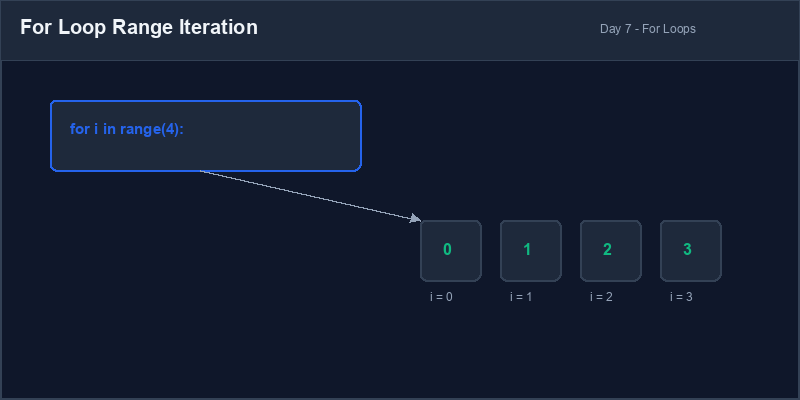
Range: A built-in Python generator that creates sequences of numbers, starting at 0 by default and stopping just before the specified limit (exclusive).
2. Iterating Through Strings Character-by-Character
In Python, a string is a sequence of characters. We can use a for loop to unpack a
string and inspect or manipulate each character one-by-one:
word = "PYTHON"
for char in word:
    print(char) # Prints each letter on a new line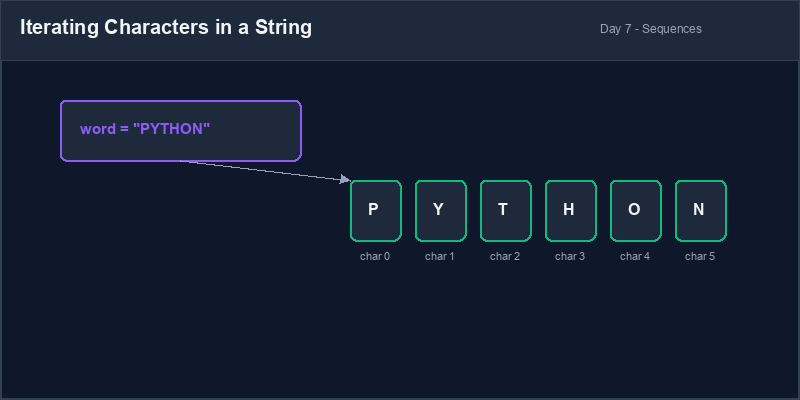
3. Controlling Loops: Break and Continue
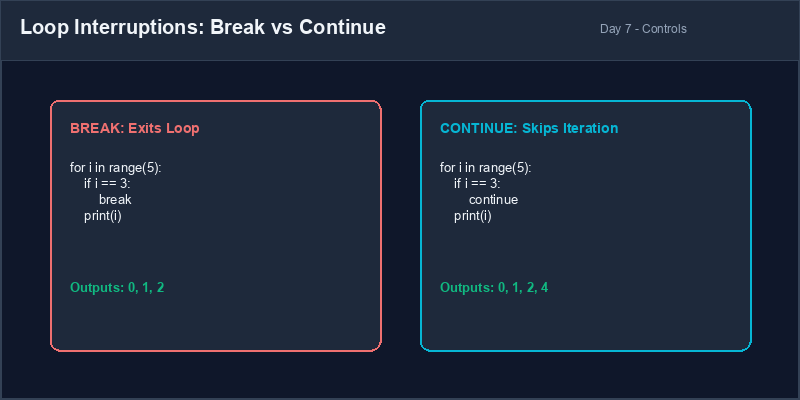
We can control the behavior of our loops dynamically using two statement modifiers:
break: Immediately exits the loop, skipping any remaining iterations.continue: Skips the rest of the current iteration block and jumps immediately to the next loop pass.
For vs While Decision: Use a for loop when you know beforehand how
many times the loop should run (e.g. iterate 10 times, or read every character of a word). Use a
while loop when the loop must run until an event occurs (e.g. repeat until user
enters a correct number).
4. Resolving Off-by-One Range Errors
A common beginner mistake is assuming that range(n) includes the number n.
It does not; it stops at n - 1.
# Trying to print 1 to 5 but stops at 4
for i in range(1, 5):
print(i) # Outputs: 1, 2, 3, 4# End index must be 6 to include 5
for i in range(1, 6):
print(i) # Outputs: 1, 2, 3, 4, 51. التكرار عبر النطاق الرقمي باستخدام حلقات For
بينما تستمر حلقة while في العمل طالما أن الشرط صحيح، صُممت حلقة for
للتكرار عبر سلسلة محددة مسبقاً (مثل نطاق من الأرقام، أو حروف نص معين). وهذا يجعل حلقة for
أقل عرضة لأخطاء الحلقات اللانهائية غير المقصودة.
تقوم دالة range() المدمجة في بايثون بتوليد متتالية من الأعداد الصحيحة. على سبيل المثال،
تولد range(4) الأرقام 0, 1, 2, 3. ويأخذ متغير التكرار كل قيمة بالتوالي في كل
دورة.
# التكرار باستخدام range
for i in range(4):
print(f"Index i is now: {i}")النطاق (Range): مولد مدمج في بايثون ينشئ متتالية من الأرقام، تبدأ من 0 افتراضياً وتتوقف قبل الحد الأقصى المحدد مباشرة (لا تشمله).
2. التكرار عبر النصوص حرفاً بحرف
في بايثون، يعتبر النص متتالية من الحروف. يمكننا استخدام حلقة for لتفكيك النص والتحقق من
كل حرف أو معالجته بمفرده:
word = "PYTHON"
for char in word:
print(char) # يطبع كل حرف في سطر جديد3. التحكم في الحلقات: Break و Continue
يمكننا تغيير سلوك الحلقات التكرارية ديناميكياً باستخدام جملتين مساعدتين:
break: تنهي حلقة التكرار وتخرج منها فوراً، متجاهلة أي دورات متبقية.continue: تتخطى الأسطر المتبقية في الدورة الحالية وتنتقل فوراً إلى الدورة التالية للحلقة.
متى نستخدم For أو While؟ استخدم حلقة for عندما تعرف مسبقاً عدد مرات
التكرار المطلوبة (مثال: تكرار الكود 10 مرات، أو فحص كل حرف في كلمة). واستخدم حلقة
while عندما يجب أن يستمر التكرار حتى وقوع حدث معين (مثال: إعادة المحاولة حتى يدخل
المستخدم الرقم الصحيح).
4. حل أخطاء النطاق الرقمي الشائعة (Off-by-One)
من الأخطاء الشائعة للمبتدئين الاعتقاد بأن نطاق range(n) يشمل الرقم n. هذا
غير صحيح، فهو يتوقف دائماً عند الرقم n - 1.
# محاولة طباعة الأرقام من 1 إلى 5 ولكن البرنامج يتوقف عند 4
for i in range(1, 5):
print(i) # المخرجات: 1, 2, 3, 4# يجب كتابة رقم النهاية كـ 6 ليشمل الرقم 5
for i in range(1, 6):
print(i) # المخرجات: 1, 2, 3, 4, 5Bilingual Vowel Counter عداد الحروف المتحركة
Write a script that counts how many vowels (a, e, i, o, u) are in a user's text input:
- Ask the user to enter a sentence using
input(). - Initialize a counter variable
vowel_countto 0. - Convert the sentence to lowercase so you check both uppercase and lowercase letters easily.
- Use a
forloop to iterate through every character of the sentence:- If the character is in the list of vowels (
"a","e","i","o","u"), increment the counter by 1.
- If the character is in the list of vowels (
- Print the final count of vowels using an f-string.
اكتب برنامجاً يقوم بعدد الحروف المتحركة (vowels: a, e, i, o, u) في نص يدخله المستخدم:
- اطلب من المستخدم إدخال جملة نصية باستخدام
input(). - قم بتهيئة متغير العداد
vowel_countبقيمة 0. - حول الجملة إلى أحرف صغيرة (lowercase) لتسهيل المقارنة وتفادي عدم تطابق حالة الأحرف.
- استخدم حلقة
forللمرور على كل حرف في الجملة:- إذا كان الحرف أحد الحروف المتحركة (
"a"،"e"،"i"،"o"،"u")، فزد العداد بمقدار 1.
- إذا كان الحرف أحد الحروف المتحركة (
- اطبع العدد الإجمالي للحروف المتحركة باستخدام f-string.
Model Answer (Python Code)
الإجابة النموذجية (كود بايثون)
# Step 1: Capture sentence
sentence = input("Enter a sentence: ")
vowel_count = 0

# Step 2: Convert to lowercase for comparison
lowercase_sentence = sentence.lower()

# Step 3: Iterate characters using a for loop
for char in lowercase_sentence:
    if char == 'a' or char == 'e' or char == 'i' or char == 'o' or char == 'u':
        vowel_count += 1

# Step 4: Output count
print(f"The sentence contains {vowel_count} vowels.")
Run the code above in your Thonny or VS Code IDE. Inspect variable outputs and logic flow to ensure it behaves exactly as described. قم بتشغيل الكود أعلاه في بيئة Thonny أو VS Code. تتبع مخرجات المتغيرات ومسار المنطق للتأكد من عمل الكود بالشكل الصحيح.