Introduction to While Loops مقدمة إلى حلقات التكرار (While Loops)
Learning Outcomes مخرجات التعلم
- Construct 'while' loops for repeated block execution.
- Identify the conditions that cause infinite loops and prevent them.
- Use counter variables to manage and control loop iterations.
- Handle invalid cases by validating inputs repeatedly until correct.
- بناء حلقات تكرار 'while' لتنفيذ كود برمجي بشكل متكرر.
- تحديد الظروف والبرمجيات التي تسبب الحلقات التكرارية اللانهائية (Infinite Loops) وتجنبها.
- استخدام متغيرات العداد (Counters) لإدارة والتحكم في عدد مرات تكرار الحلقة.
- معالجة البيانات غير الصحيحة عن طريق إلزام المستخدم بإعادة الإدخال حتى إعطاء قيمة صحيحة.
1. Repeating Tasks with While Loops
Writing duplicate code for repetitive tasks is highly inefficient. Programming languages solve this
using **loops**. In Python, a **while loop** repeatedly executes a block of indented code as long as
its conditional expression remains True.
Every iteration, Python checks the loop condition. If it is True, it runs the block. If
it evaluates to False, Python skips the loop entirely and continues with the lines below
it.
# Simple counter while loop
count = 1
while count <= 5:
    print(f"Iteration number: {count}")
    count += 1 # Critical update step
print("Loop finished!")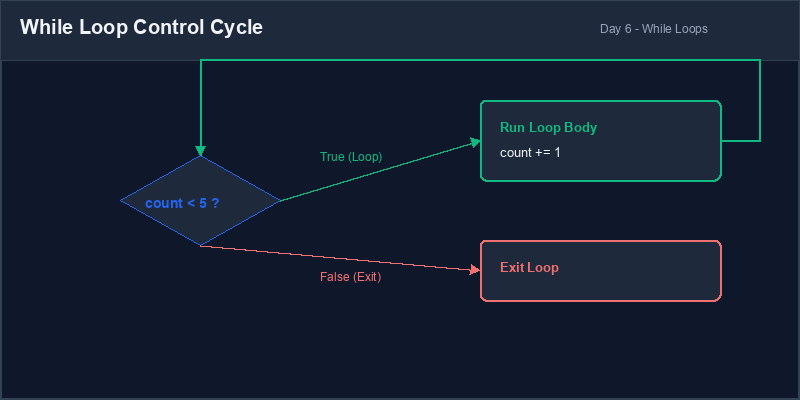
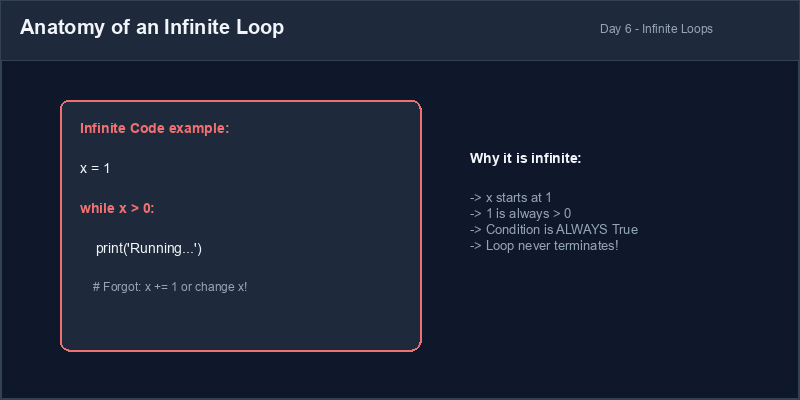
Infinite Loop: A loop whose conditional check is always
True, causing
it to run forever until the computer runs out of memory or the process is forced to terminate.
2. Preventing Infinite Loops
For a loop to finish, something inside the loop block must eventually change the condition's
variables so that the check becomes False. If you forget to update your counter or
variables inside the loop, you will create an **infinite loop**.
If your program gets stuck in Thonny or VS Code running indefinitely, you can stop it manually by pressing the **Stop** button or hitting Ctrl + C in your console.
3. Repeated Input Validation Loops
One of the most common uses of a while loop is to force users to enter valid
information. Rather than stopping the program with an error message, a validation loop repeatedly asks
the user for input until they provide a value that satisfies your rules.
# Forcing correct digit inputs
age_input = ""
while not age_input.isdigit():
    age_input = input("Enter a valid numeric age: ")
    if not age_input.isdigit():
        print("Invalid entry! Numbers only.")
age = int(age_input)
print(f"Age recorded: {age}")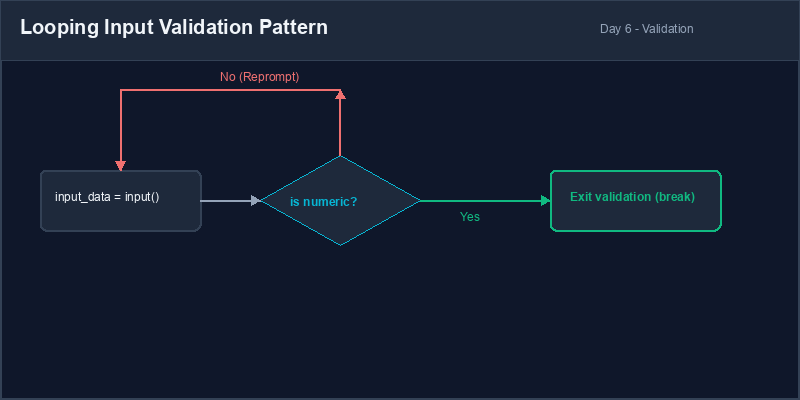
Infinite Loop Safeguard: When writing loops, always double-check: "Is there a line inside this loop that will eventually make the condition False?" If not, your program will freeze.
4. Resolving Infinite Iteration Issues
Be careful when updating counters: decrementing when you should increment, or using incorrect operator signs, can lead to endless loops.
# count goes down, so it is always <= 5
count = 1
while count <= 5:
    print(count)
count -= 1 # Bug: decrementing counter!# count goes up, eventually breaking condition
count = 1
while count <= 5:
print(count)
count += 1 # Correct increment1. تكرار المهام باستخدام حلقات التكرار (While Loops)
تكرار الأسطر البرمجية للمهام المتكررة يعتبر أسلوباً غير فعال. تحل لغات البرمجة هذه المشكلة عن طريق
حلقات التكرار (Loops). في بايثون، تقوم حلقة while بتنفيذ كود محاذٍ
للداخل بشكل متكرر ما دام الشرط المنطقي الخاص بها يساوي True.
في كل دورة تكرار، تفحص بايثون الشرط. إذا كان True، يتم تنفيذ كتلة الكود. وإذا أصبح
False، تتخطى بايثون الحلقة وتنتقل للأسطر التي تليها مباشرة.
# حلقة عداد بسيطة باستخدام while
count = 1
while count <= 5:
    print(f"Iteration number: {count}")
    count += 1 # خطوة تحديث العداد الضرورية
print("Loop finished!")الحلقة اللانهائية (Infinite Loop): حلقة تكرار يكون شرط التحقق منها دائماً
True، مما يجعلها تعمل بلا توقف حتى تنفد ذاكرة الجهاز أو يتم إغلاقه بالقوة.
2. منع حدوث الحلقات التكرارية اللانهائية
لكي تنتهي الحلقة، يجب أن يحدث شيء داخل كتلتها البرمجية يغير قيم المتغيرات بحيث يؤول الشرط في النهاية
إلى False. إذا نسيت تحديث عدادك أو المتغيرات المسؤولة عن الشرط، فستنشئ حلقة
لانهائية.
إذا علق برنامجك في بيئة Thonny أو VS Code في تكرار لانهائي، يمكنك إيقافه يدوياً بالضغط على زر إيقاف (Stop) أو الضغط على الاختصار Ctrl + C في لوحة التحكم.
3. التحقق من المدخلات باستخدام الحلقات التكرارية
أحد الاستخدامات الشائعة لحلقة while هو إجبار المستخدمين على إدخال قيم صحيحة ومقبولة.
بدلاً من إيقاف البرنامج برسالة خطأ، تطلب الحلقة تكرار الإدخال حتى يدخل المستخدم قيمة مقبولة تطابق
شروطك.
# إجبار المستخدم على إدخال أرقام فقط
age_input = ""
while not age_input.isdigit():
    age_input = input("Enter a valid numeric age: ")
    if not age_input.isdigit():
        print("Invalid entry! Numbers only.")
age = int(age_input)
print(f"Age recorded: {age}")أمان حلقة التكرار: عند كتابة حلقة تكرار، اسأل نفسك دائماً: "هل يوجد سطر داخل هذه الحلقة سيجعل الشرط خاطئاً في النهاية؟" إن لم يوجد، فسيتجمد برنامجك.
4. حل مشكلات التكرار اللانهائي
كن حذراً عند التعامل مع العدادات: فالطرح بدلاً من الجمع، أو استخدام علامات مقارنة خاطئة، يمكن أن يؤدي لحلقات لانهائية.
# ينقص العداد تدريجياً، لذا يبقى دائماً أقل من 5
count = 1
while count <= 5:
    print(count)
count -= 1 # خطأ: إنقاص العداد!# يرتفع العداد تدريجياً حتى ينكسر الشرط
count = 1
while count <= 5:
print(count)
count += 1 # زيادة صحيحةBilingual Guessing Game لعبة التخمين التفاعلية
Design a guessing game that asks the user to guess a secret number until they get it correct:
- Create a variable
secret_numberand assign it the integer 7. - Write a
whileloop that keeps running as long as the user's guess is not equal to the secret number. - Inside the loop:
- Ask the user to enter their guess and cast it to an integer (verify with
isdigit()first to keep it safe!). - If the guess is incorrect, print "Wrong guess! Try again."
- Ask the user to enter their guess and cast it to an integer (verify with
- Once the user guesses correctly, exit the loop and print "Success! You guessed the secret number!"
قم بتصميم لعبة تخمين تطلب من المستخدم تخمين رقم سري حتى يتوصل للإجابة الصحيحة:
- أنشئ متغيراً باسم
secret_numberوخصص له قيمة الرقم 7. - اكتب حلقة
whileتعمل طالما أن تخمين المستخدم لا يساوي الرقم السري. - داخل حلقة التكرار:
- اطلب من المستخدم إدخال تخمينه وحوله لعدد صحيح (تحقق من صحته بـ
isdigit()أولاً لضمان عدم توقف البرنامج). - إذا كان التخمين خاطئاً، اطبع "تخمين خاطئ! حاول مرة أخرى".
- اطلب من المستخدم إدخال تخمينه وحوله لعدد صحيح (تحقق من صحته بـ
- بمجرد تخمين الرقم الصحيح، اخرج من الحلقة واطبع "أحسنت! لقد خمنت الرقم السري بنجاح!".
Model Answer (Python Code)
الإجابة النموذجية (كود بايثون)
# Step 1: Set the secret target
secret_number = 7
user_guess = 0

# Step 2: Loop until correct guess
while user_guess != secret_number:
    guess_input = input("Guess the secret number (1-10): ")

    # Validation step
    if guess_input.isdigit():
        user_guess = int(guess_input)

        # Check guess status
        if user_guess != secret_number:
            print("Wrong guess! Try again.")
    else:
        print("Please enter a valid whole number!")

# Step 3: Success message after exiting loop
print("Success! You guessed the secret number!")
Run the code above in your Thonny or VS Code IDE. Inspect variable outputs and logic flow to ensure it behaves exactly as described. قم بتشغيل الكود أعلاه في بيئة Thonny أو VS Code. تتبع مخرجات المتغيرات ومسار المنطق للتأكد من عمل الكود بالشكل الصحيح.