Advanced List Manipulation العمليات المتقدمة على القوائم وتعديلها
Learning Outcomes مخرجات التعلم
- Append and insert new items into an existing list.
- Remove items from a list using pop() or remove() methods.
- Sort and reverse the order of list elements.
- Combine multiple lists or perform list slicing to extract data segments.
- إضافة عناصر جديدة للقائمة باستخدام دالتي الإضافة append() و insert().
- حذف عناصر من القائمة باستخدام دالتي الحذف pop() و remove().
- فرز وعكس ترتيب عناصر القائمة (Sort and Reverse).
- دمج القوائم المختلفة وتقطيع القوائم (Slicing) لاستخلاص أجزاء محددة من البيانات.
1. Ingesting Elements: Append vs Insert
Rather than just overwriting elements, we often want to add new items to an existing list. Python provides two primary methods for list ingestion:
append(item): Adds the item to the very end of the list. The size of the list increases by one.insert(index, item): Inserts the item at the specified index position, shifting all subsequent elements to the right.
numbers = [10, 20, 30]
numbers.append(40)      # numbers becomes [10, 20, 30, 40]
numbers.insert(1, 99)   # numbers becomes [10, 99, 20, 30, 40]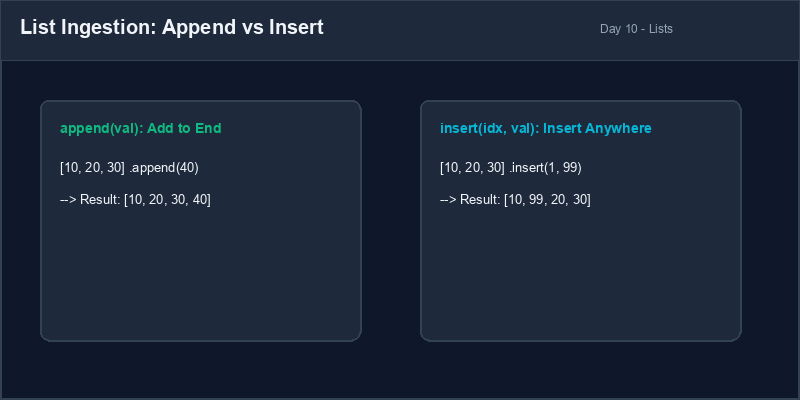
list[start:end:step].List Method: Built-in functions that belong to the list object (like
.append() or .pop()) called using dot notation.
2. Deleting Elements: Pop vs Remove
To remove items from a list, Python provides two distinct methods depending on whether you know the index or the actual value:
pop(index): Removes and returns the item at the specified index. If no index is provided, it removes and returns the last item.remove(value): Finds and deletes the first occurrence of the specified value. If the value is not in the list, it raises aValueError.
items = ["a", "b", "c", "b"]
removed_val = items.pop(0) # Removes 'a' at index 0. items becomes ['b', 'c', 'b']
items.remove("b")          # Removes first 'b'. items becomes ['c', 'b']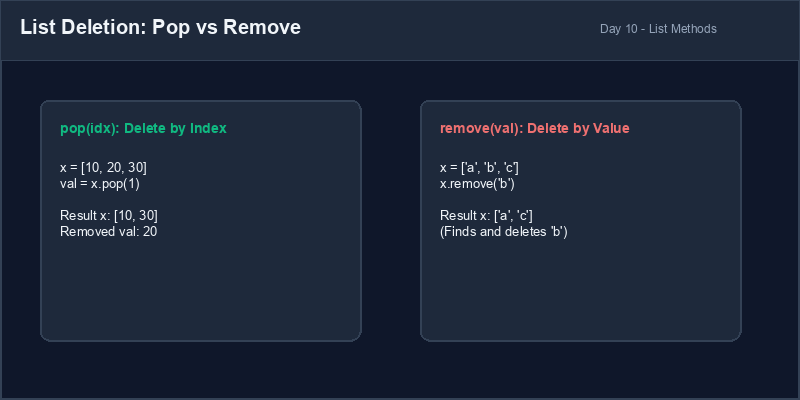
3. Sorting and Reversing Lists
You can reorganize lists easily using built-in methods:
sort(): Sorts elements in place (ascending order by default for numbers and alphabetical for strings).reverse(): Reverses the order of elements in place.
scores = [15, 3, 42, 8]
scores.sort()    # scores becomes [3, 8, 15, 42]
scores.reverse() # scores becomes [42, 15, 8, 3]
4. List Slicing
**List slicing** allows you to retrieve a segment of a list. The syntax is
list[start:end:step], where `start` is the starting index (inclusive), `end` is the
ending index (exclusive), and `step` is the increment size.
letters = ["a", "b", "c", "d", "e"]
# Extract indices 1 to 3
slice1 = letters[1:4] # returns ['b', 'c', 'd']
# Take every second element
slice2 = letters[::2] # returns ['a', 'c', 'e']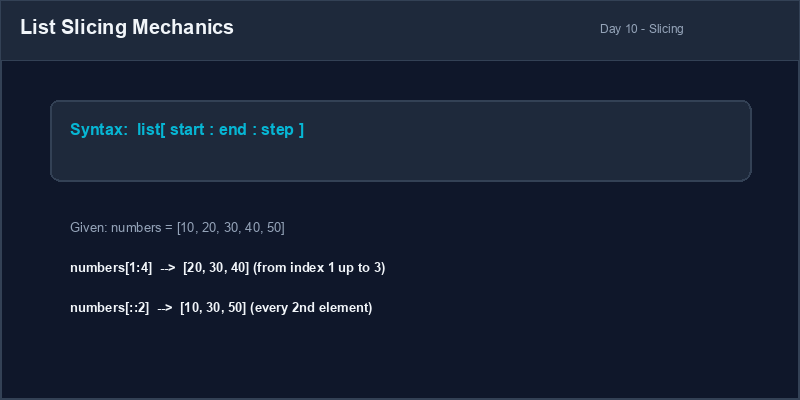
Value Removal Danger: Using .remove(val) on a value that does not
exist in the list will crash your program. Always verify that the item exists in the list first
using the in membership check: if val in my_list: my_list.remove(val).
5. Safely Removing Items
Always verify value existence or wrap code appropriately to prevent list method crashes.
# Crashes if "cherry" is not in the list
basket = ["apple", "banana"]
basket.remove("cherry") # ValueError!basket = ["apple", "banana"]
if "cherry" in basket:
basket.remove("cherry") # Safe
else:
print("Item not found.")1. إضافة عناصر جديدة: Append مقابل Insert
بدلاً من مجرد تعديل العناصر الموجودة، نريد غالباً إضافة عناصر جديدة إلى قائمة حالية. توفر بايثون دالتين رئيسيتين لإضافة العناصر:
append(item): تضيف العنصر الجديد إلى نهاية القائمة تماماً، ويزيد طول القائمة بمقدار واحد.insert(index, item): تُدخل العنصر الجديد في موقع الفهرس المحدد، وتقوم بإزاحة العناصر اللاحقة خطوة نحو اليمين.
numbers = [10, 20, 30]
numbers.append(40)      # تصبح القائمة [10, 20, 30, 40]
numbers.insert(1, 99) # تصبح القائمة [10, 99, 20, 30, 40]list[start:end:step].دوال الكائنات (List Method): دوال مبنية داخل لغة بايثون وتتبع كائن القائمة مباشرة (مثل
.append() أو .pop()) ويتم استدعاؤها بالنقطة.
2. حذف العناصر: Pop مقابل Remove
لحذف العناصر من القائمة، توفر بايثون طريقتين مختلفتين اعتماداً على ما إذا كنت تعرف موقع العنصر (الفهرس) أو قيمة العنصر نفسه:
pop(index): تحذف وتسترجع العنصر الموجود في الفهرس المحدد. إذا لم تحدد فهرساً، فإنها تحذف وتسترجع العنصر الأخير.remove(value): تبحث وتحذف أول ظهور للقيمة المحددة من القائمة. وإذا لم تكن القيمة موجودة، يحدث خطأValueError.
items = ["a", "b", "c", "b"]
removed_val = items.pop(0) # تحذف 'a' في الفهرس 0. تصبح القائمة ['b', 'c', 'b']
items.remove("b") # تحذف أول ظهور لـ 'b'. تصبح القائمة ['c', 'b']3. فرز وعكس ترتيب القوائم
يمكنك إعادة تنظيم ترتيب العناصر داخل القائمة بسهولة باستخدام دوال مدمجة:
sort(): ترتب العناصر داخل القائمة تصاعدياً بشكل افتراضي (أبجدياً للنصوص ورقمياً للأعداد).reverse(): تعكس ترتيب عناصر القائمة (العنصر الأخير يصبح الأول، وهكذا).
scores = [15, 3, 42, 8]
scores.sort()    # تصبح القائمة [3, 8, 15, 42]
scores.reverse() # تصبح القائمة [42, 15, 8, 3]
4. تقطيع القوائم (List Slicing)
تتيح لك ميزة **تقطيع القوائم** الحصول على جزء فرعي من القائمة. الصيغة البرمجية هي
list[start:end:step]، حيث start هو فهرس البداية (مشمول)، و end
هو فهرس النهاية (مستثنى)، و step هو مقدار القفزة (الخطوة).
letters = ["a", "b", "c", "d", "e"]
# استخلاص العناصر من الفهرس 1 إلى 3
slice1 = letters[1:4] # تعيد ['b', 'c', 'd']
# أخذ كل عنصر ثانٍ في القائمة
slice2 = letters[::2] # تعيد ['a', 'c', 'e']خطورة استخدام remove: استخدام .remove(val) لحذف قيمة غير موجودة
بالقائمة سيؤدي لتوقف البرنامج فوراً. تحقق دائماً من وجود العنصر أولاً باستخدام الفحص
in: if val in my_list: my_list.remove(val).
5. حذف العناصر بأمان
تحقق دائماً من وجود العنصر في القائمة قبل حذفه بالقيمة لتجنب أخطاء التشغيل.
# يتوقف البرنامج إذا لم تكن "cherry" في السلة
basket = ["apple", "banana"]
basket.remove("cherry") # ValueError!basket = ["apple", "banana"]
if "cherry" in basket:
basket.remove("cherry") # آمن
else:
print("Item not found.")Student Roster Manager إدارة قائمة طلاب الفصل
Write a script to manage a list of students in a class. Perform insertions, deletions, sorting, and slicing:
- Create a list
rostercontaining: "Dave", "Alice", "Charlie", "Bob". - Add "Eva" to the end of the roster using
append(). - Insert "Frank" at the second position (index 1) using
insert(). - Remove "Charlie" from the list using
remove(). - Sort the roster in alphabetical order using
sort(). - Use slicing to extract and print the first three students in the sorted list.
اكتب برنامجاً لإدارة قائمة طلاب في صف دراسي. قم بعمليات الإضافة والحذف والفرز والتقطيع:
- أنشئ قائمة باسم
rosterتحتوي على الأسماء التالية: "Dave" و "Alice" و "Charlie" و "Bob". - أضف الطالبة "Eva" لنهاية القائمة باستخدام
append(). - أدرج الطالب "Frank" في الموقع الثاني (الفهرس 1) باستخدام دالة
insert(). - احذف الطالب "Charlie" من القائمة باستخدام دالة
remove(). - رتب قائمة الطلاب أبجدياً باستخدام دالة
sort(). - استخدم تقطيع القوائم (Slicing) لاستخلاص وطباعة أول ثلاثة طلاب في القائمة المرتبة.
Model Answer (Python Code)
الإجابة النموذجية (كود بايثون)
# Step 1: Create initial roster
roster = ["Dave", "Alice", "Charlie", "Bob"]

# Step 2: Append and Insert students
roster.append("Eva")
roster.insert(1, "Frank")
print("After additions:", roster)

# Step 3: Remove student
if "Charlie" in roster:
    roster.remove("Charlie")
print("After removing Charlie:", roster)

# Step 4: Sort alphabetically
roster.sort()
print("Sorted roster:", roster)

# Step 5: Slice the first three students
top_three = roster[0:3]
print("Top three students:", top_three)
Run the code above in your Thonny or VS Code IDE. Inspect variable outputs and logic flow to ensure it behaves exactly as described. قم بتشغيل الكود أعلاه في بيئة Thonny أو VS Code. تتبع مخرجات المتغيرات ومسار المنطق للتأكد من عمل الكود بالشكل الصحيح.