User Input and Type Casting إدخال البيانات من المستخدم وتحويل أنواعها
Learning Outcomes مخرجات التعلم
- Capture dynamic user input using the built-in input() function.
- Convert string inputs into integers or floats using type casting.
- Validate the structural integrity of inputs before performing calculations.
- Generate structured console outputs based on user-provided data.
- استقبال مدخلات ديناميكية من المستخدم باستخدام دالة الإدخال المدمجة input().
- تحويل المدخلات النصية إلى أعداد صحيحة أو عشرية باستخدام التحويل البرمجي للأنواع (Type Casting).
- التحقق من سلامة وصلاحية المدخلات هيكلياً قبل إجراء أي حسابات رياضية عليها.
- إنشاء مخرجات منظمة في لوحة التحكم اعتماداً على البيانات التي يوفرها المستخدم.
1. Capturing User Inputs with input()
Programs are much more powerful when they can interact with users. Python provides the built-in
input() function to capture user keystrokes from the interactive console. When Python
hits an input() line, it pauses execution and waits for the user to type something and
press Enter.
Crucial Rule: The input() function always returns a string
(str), even if the user types numbers like 42 or 9.8. If you try
to perform math on it immediately, you will get errors or unexpected behaviors.
# Prompting the user
user_age = input("Enter your age: ")
print(type(user_age)) # Outputs: <class 'str'>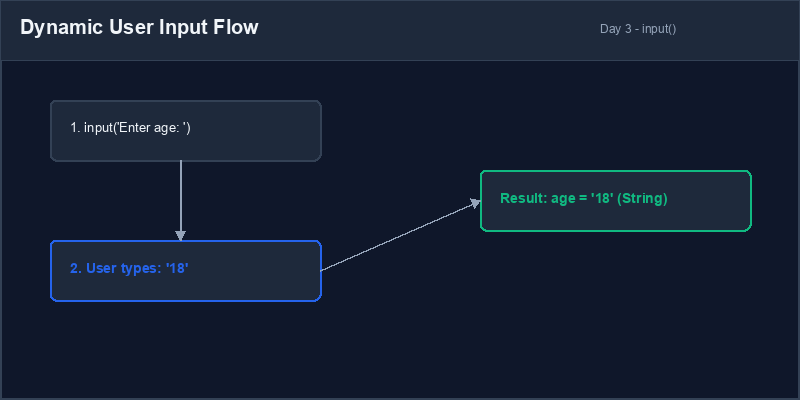
input("Prompt Message") to tell the user what to type.Type Casting: Explicitly converting a variable from one data type to another (e.g. converting
"15" to 15).
2. Explicit Type Casting (str to int/float)
To perform math on values retrieved from the user, you must convert the string into a numeric data type. We do this using casting functions:
int(value): Converts compatible strings or floats to integers.float(value): Converts strings or integers to decimals.str(value): Converts numbers or booleans back into text strings.
# Correct numerical casting
age_str = input("Enter age: ")
age_num = int(age_str) # Converts string '25' to integer 25
next_year = age_num + 1
print(f"Next year you will be {next_year}")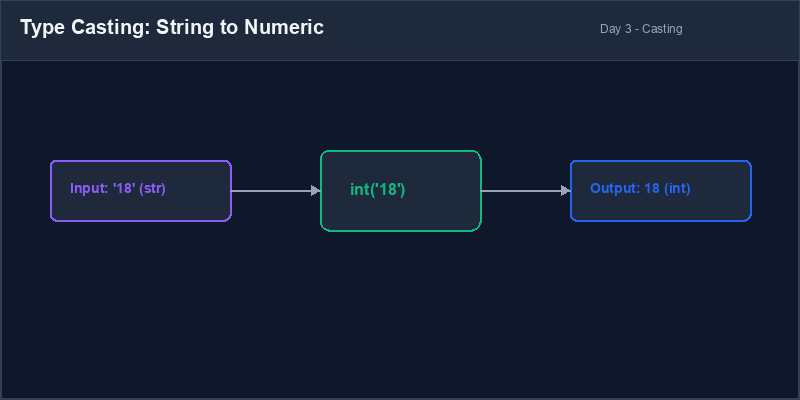
3. Basic Input Validation
If a user enters non-numeric text (like "hello") and you attempt to convert it using
int(), your program will crash with a ValueError. We can check the string
before casting it using helper methods like isdigit(), which returns True if
the string contains only numbers.
user_entry = input("Enter quantity: ")
if user_entry.isdigit():
    quantity = int(user_entry)
    print(f"Order processed for {quantity} items.")
else:
    print("Error: Please enter a valid number!")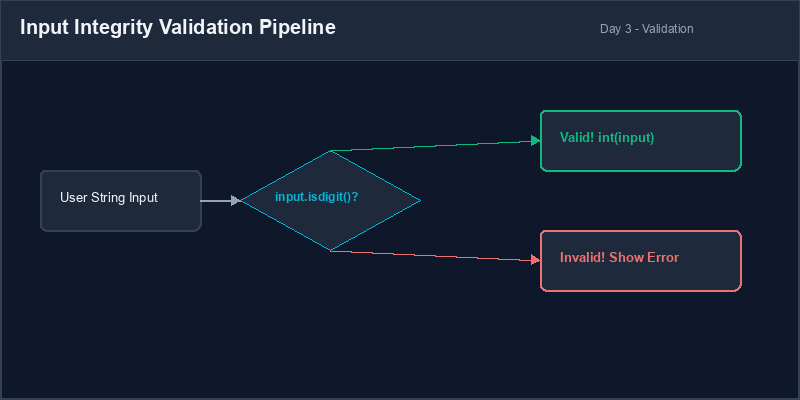
4. Typical Conversion Errors
Always ensure that the string being cast actually looks like a number. Empty spaces or decimal points
inside int() will trigger immediate runtime exceptions.
# This crashes if user inputs text or decimals
items = input("How many? ")
count = int(items) # Fatal error if items is 'three' or '3.5'
print(f"Total count is {count}")items = input("How many? ")
if items.isdigit():
count = int(items)
print(f"Total count is {count}")
else:
print("Invalid entry. Assuming count is 0.")
count = 01. استقبال مدخلات المستخدم باستخدام input()
تصبح البرامج أكثر فائدة وقوة عندما تتفاعل مع المستخدمين. توفر بايثون دالة input()
المدمجة لاستقبال ما يكتبه المستخدم في كونسول الأوامر. عندما يصل البرنامج إلى سطر يحتوي على
input()، فإنه يتوقف مؤقتاً وينتظر حتى يكتب المستخدم البيانات ثم يضغط على مفتاح Enter.
قاعدة بالغة الأهمية: تعيد دالة input() دائماً قيمة من نوع نص
(String)، حتى لو قام المستخدم بكتابة أرقام مثل 42 أو 9.8. إذا
حاولت إجراء عمليات حسابية عليها مباشرة، فسيؤدي ذلك لحدوث أخطاء.
# مطالبة المستخدم بإدخال بيانات
user_age = input("Enter your age: ")
print(type(user_age)) # المخرج: <class 'str'>input("رسالة توضيحية") لتوضيح ما يجب على المستخدم كتابته.تحويل أنواع البيانات (Type Casting): تحويل نوع المتغير صراحة من نوع إلى آخر في الكود (مثل تحويل النص
"15" إلى العدد الصحيح 15).
2. التحويل الصريح لأنواع البيانات (Type Casting)
لإجراء عمليات حسابية على قيم تم استقبالها من المستخدم، يجب عليك أولاً تحويل النص إلى نوع بيانات رقمي مناسب. نستخدم لهذا الغرض دوال التحويل التالية:
int(value): تحويل النصوص المتوافقة أو الأعداد العشرية إلى أعداد صحيحة.float(value): تحويل النصوص أو الأعداد الصحيحة إلى أعداد عشرية.str(value): تحويل الأرقام أو القيم المنطقية مرة أخرى إلى نصوص.
# تحويل رقمي صحيح للمدخلات
age_str = input("Enter age: ")
age_num = int(age_str) # يحول النص '25' إلى العدد الصحيح 25
next_year = age_num + 1
print(f"Next year you will be {next_year}")3. التحقق الأساسي من صحة المدخلات
إذا أدخل المستخدم نصاً غير رقمي (مثل "hello") وحاولت تحويله باستخدام int()،
سيتوقف البرنامج عن العمل فجأة بسبب خطأ القيمة (ValueError). يمكننا التحقق من النص قبل
تحويله باستخدام دوال مساعدة مثل isdigit() التي تعيد True إذا كان النص يحتوي
على أرقام فقط.
user_entry = input("Enter quantity: ")
if user_entry.isdigit():
    quantity = int(user_entry)
    print(f"Order processed for {quantity} items.")
else:
print("Error: Please enter a valid number!")4. أخطاء التحويل الشائعة
تأكد دائماً من أن النص الذي ترغب في تحويله يمثل عدداً فعلياً. وجود مسافات فارغة أو علامات عشرية داخل
دالة int() سيؤدي لخطأ فوري أثناء التشغيل.
# يتوقف البرنامج إذا أدخل المستخدم نصاً أو كسوراً عشرياً
items = input("How many? ")
count = int(items) # خطأ قاتل إذا كانت القيمة 'three' أو '3.5'
print(f"Total count is {count}")items = input("How many? ")
if items.isdigit():
count = int(items)
print(f"Total count is {count}")
else:
print("Invalid entry. Assuming count is 0.")
count = 0Interactive Age Calculator حاسبة العمر التفاعلية
Create a script that calculates a user's birth year based on their age:
- Ask the user for their name using
input()and store it. - Ask the user for their age using
input(). - Convert the age input into an integer. Add basic validation using
isdigit(). - Subtract their age from the current year (e.g. 2026) to determine their birth year.
- Print a personalized message using an f-string telling them their name and calculated birth year.
اكتب برنامجاً يقوم بحساب سنة ميلاد المستخدم بناءً على عمره الحالي:
- اطلب اسم المستخدم باستخدام دالة
input()وقم بتخزينه. - اطلب عمر المستخدم باستخدام دالة
input(). - حول العمر المدخل إلى عدد صحيح بعد التحقق من صحته باستخدام
isdigit(). - اطرح العمر من السنة الحالية (مثلاً: 2026) لتحديد سنة ميلاد المستخدم.
- اطبع رسالة مخصصة للمستخدم باستخدام f-string تعرض اسمه وسنة ميلاده المحسوبة.
Model Answer (Python Code)
الإجابة النموذجية (كود بايثون)
# Step 1: Capture user inputs
name = input("Enter your name: ")
age_input = input("Enter your age: ")

# Step 2: Validate input before casting
if age_input.isdigit():
    age = int(age_input)
    current_year = 2026
    birth_year = current_year - age

    # Step 3: Print structured output
    print(f"Hello, {name}!")
    print(f"Based on your age ({age}), you were born around the year {birth_year}.")
else:
    print("Error: Age must be a valid positive whole number!")
Run the code above in your Thonny or VS Code IDE. Inspect variable outputs and logic flow to ensure it behaves exactly as described. قم بتشغيل الكود أعلاه في بيئة Thonny أو VS Code. تتبع مخرجات المتغيرات ومسار المنطق للتأكد من عمل الكود بالشكل الصحيح.