Arithmetic and String Operations العمليات الحسابية والعمليات على النصوص
Learning Outcomes مخرجات التعلم
- Perform arithmetic operations (+, -, *, /) on numeric variables.
- Apply string concatenation to combine text dynamically.
- Use string formatting (f-strings) to inject variables into output sentences.
- Identify and resolve common syntax errors related to operators.
- إجراء العمليات الحسابية الأساسية (+، -، *، /) على المتغيرات الرقمية.
- تطبيق دمج النصوص (Concatenation) لدمج النصوص بشكل ديناميكي.
- استخدام صياغة النصوص (f-strings) لإدخال قيم المتغيرات داخل الجمل النصية.
- تحديد وحل الأخطاء البرمجية الشائعة المتعلقة بالمعاملات وأنواع البيانات.
1. Arithmetic Operators and Expressions
Python allows you to perform mathematical calculations using standard arithmetic operators. When writing numerical expressions, Python follows the standard mathematical order of operations (PEMDAS/BODMAS): parentheses first, followed by exponentiation, multiplication and division, and finally addition and subtraction.
| Operator | Operation | Python Code Example | Evaluation Result |
|---|---|---|---|
+ |
Addition | 10 + 5 |
15 |
- |
Subtraction | 10 - 5 |
5 |
* |
Multiplication | 10 * 5 |
50 |
/ |
Division (Always floats) | 10 / 5 |
2.0 |
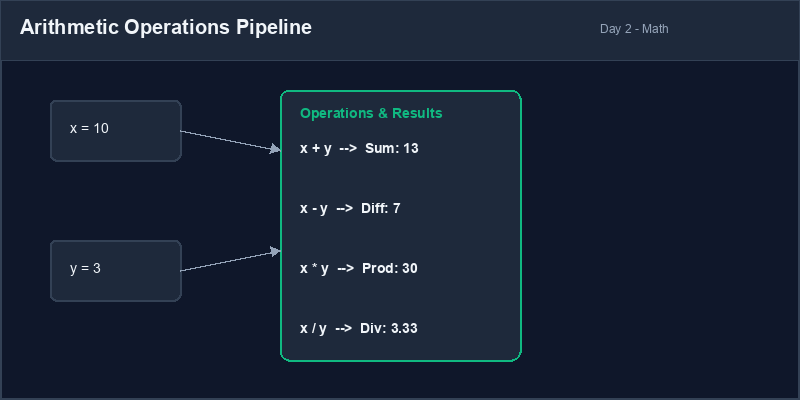
/ operator always
results in a decimal float value (e.g. 10 / 5 evaluates to 2.0, not
2).Operator Precedence: The order in which Python evaluates parts of a mathematical expression (Parentheses, Exponents, Multiplication/Division, Addition/Subtraction).
2. String Concatenation
In addition to numbers, operators can sometimes be applied to strings. The addition operator
(+) behaves differently when applied to strings: it performs
concatenation, which joins two or more strings together end-to-end to form a single,
unified string.
first_name = "Jane"
last_name = "Doe"
# Concatenating strings with a space in between
full_name = first_name + " " + last_name
print(full_name) # Outputs: Jane Doe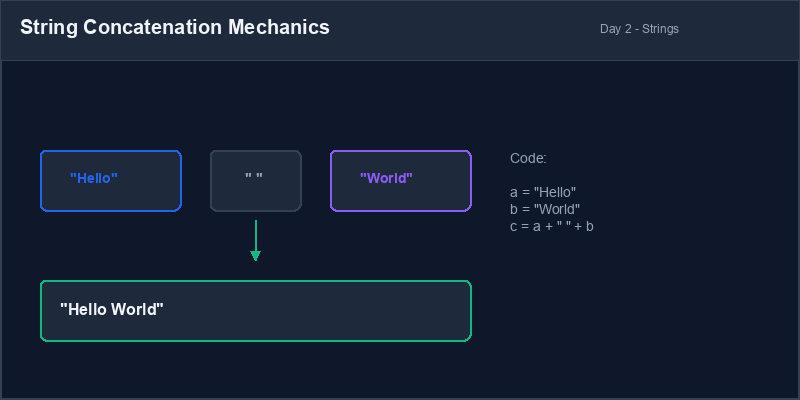
Type mismatch error: You cannot concatenate a string and a number directly using
the + operator. For example, "Age: " + 25 will raise a
TypeError: can only concatenate str (not "int") to str.
3. f-Strings (Formatted String Literals)
To construct complex text dynamically, Python provides f-strings (formatted string
literals). By placing the letter f directly before the opening quotation mark of a
string, you can inject variables or expressions directly into the text using curly braces
{} placeholders.
name = "Alice"
age = 25
# Injecting variables dynamically
greeting = f"Hello, my name is {name} and I am {age} years old."
print(greeting) # Outputs: Hello, my name is Alice and I am 25 years old.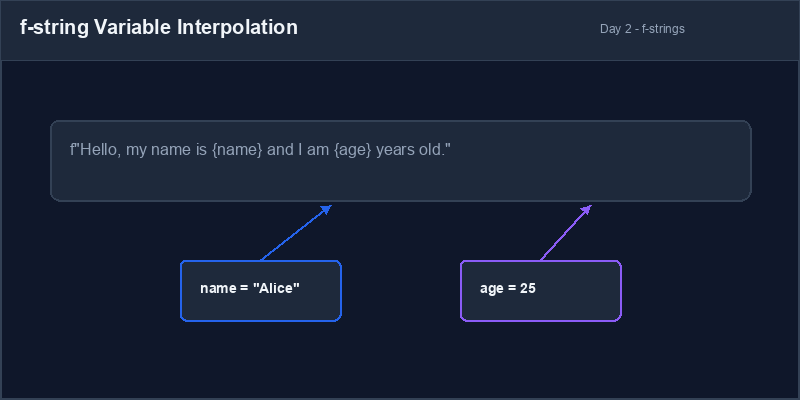
4. Troubleshooting Syntax Errors
Common operator issues often stem from mismatched data types or incomplete expressions. Make sure you match quotes properly and always keep data types aligned when applying operators.
# Attempting to combine str and int
score = 95
msg = "Your score is " + score
print(msg) # CRASHES!# Using f-string solves type mismatch
score = 95
msg = f"Your score is {score}"
print(msg) # Safe & Clean!1. المعاملات والتعبيرات الحسابية
تتيح لك بايثون إجراء الحسابات الرياضية باستخدام المعاملات الحسابية القياسية. عند كتابة تعبيرات رياضية، تتبع بايثون ترتيب العمليات الحسابية المتعارف عليه: الأقواس أولاً، ثم الأسس، تليها الضرب والقسمة، وأخيراً الجمع والطرح.
| المعامل | العملية الحسابية | مثال كود بايثون | نتيجة التقييم |
|---|---|---|---|
+ |
الجمع | 10 + 5 |
15 |
- |
الطرح | 10 - 5 |
5 |
* |
الضرب | 10 * 5 |
50 |
/ |
القسمة (تنتج دائماً أرقاماً عشرية) | 10 / 5 |
2.0 |
/ دائماً إلى نتيجة رقم عشري (مثلاً: 10 / 5 تعطي 2.0 وليس
2).أولوية المعاملات (Operator Precedence): الترتيب الذي تتبعه بايثون لحساب أجزاء المعادلة الرياضية (الأقواس، الأسس، الضرب والقسمة، ثم الجمع والطرح).
2. دمج النصوص (String Concatenation)
بالإضافة إلى الأرقام، يمكن استخدام بعض المعاملات مع النصوص. يعمل معامل الجمع (+) بشكل
مختلف عند تطبيقه على النصوص: حيث يقوم بعملية الدمج، وهي ربط نصين أو أكثر ببعضهم البعض
لتكوين نص واحد متصل.
first_name = "Jane"
last_name = "Doe"
# دمج النصوص مع إضافة مسافة بينهما
full_name = first_name + " " + last_name
print(full_name) # المخرج: Jane Doeخطأ عدم تطابق الأنواع: لا يمكنك دمج نص مع رقم مباشرة باستخدام المعامل
+. على سبيل المثال، محاولة دمج "Age: " + 25 ستؤدي لخطأ من نوع
TypeError: can only concatenate str (not "int") to str.
3. صياغة النصوص (f-Strings)
لبناء جمل نصية معقدة وديناميكية، توفر بايثون ميزة f-strings. عن طريق وضع حرف
f قبل علامات الاقتباس مباشرة، يمكنك تضمين متغيرات أو تعبيرات برمجية داخل النص مباشرة
باستخدام الأقواس المجعدة {} كحوافظ مكانية.
name = "Alice"
age = 25
# إدراج المتغيرات ديناميكياً داخل النص
greeting = f"Hello, my name is {name} and I am {age} years old."
print(greeting) # المخرج: Hello, my name is Alice and I am 25 years old.4. إصلاح أخطاء الصياغة (Syntax Errors)
تنشأ معظم أخطاء المعاملات والنصوص من محاولة دمج أنواع بيانات مختلفة دون تحويل، أو نسيان علامات الاقتباس. احرص دائماً على تطابق علامات الاقتباس وتناسق أنواع البيانات.
# محاولة دمج نص مع عدد صحيح مباشرة
score = 95
msg = "Your score is " + score
print(msg) # يتوقف البرنامج بسبب خطأ!# استخدام f-string يحل مشكلة دمج الأنواع
score = 95
msg = f"Your score is {score}"
print(msg) # يعمل بأمان وسهولة!Receipt Generator منشئ فواتير الشراء
Build a simple product checkout script. Store item details, compute totals, and format a beautiful receipt output:
- Create variables
item_name(string),price(float), andquantity(integer). - Calculate the
subtotalusing arithmetic multiplication. - Construct a formatted f-string receipt showing the item name, unit price, quantity, and total cost.
- Execute the program to ensure the variables print out accurately.
اكتب برنامجاً بسيطاً لحساب تكلفة شراء منتج. قم بتخزين تفاصيل المنتج، حساب التكلفة الكلية، ثم طباعة فاتورة منسقة بشكل احترافي:
- أنشئ المتغيرات التالية:
item_name(نص)،price(رقم عشري لل سعر)، وquantity(عدد صحيح للكمية). - احسب المجموع الفرعي
subtotalباستخدام الضرب الحسابي. - قم بصياغة فاتورة شراء باستخدام f-string تعرض اسم المنتج، سعر الوحدة، الكمية، والتكلفة الإجمالية.
- قم بتشغيل البرنامج وتأكد من طباعة النتائج بدقة ووضوح.
Model Answer (Python Code)
الإجابة النموذجية (كود بايثون)
# Step 1: Initialize variables
item_name = "Wireless Mouse"
price = 24.99
quantity = 3

# Step 2: Calculate subtotal
subtotal = price * quantity

# Step 3: Print structured receipt using f-strings
print("----- CHECKOUT RECEIPT -----")
print(f"Product:  {item_name}")
print(f"Price:    ${price} each")
print(f"Quantity: {quantity}")
print("----------------------------")
print(f"Total:    ${subtotal}")
print("----------------------------")
Run the code above in your Thonny or VS Code IDE. Inspect variable outputs and logic flow to ensure it behaves exactly as described. قم بتشغيل الكود أعلاه في بيئة Thonny أو VS Code. تتبع مخرجات المتغيرات ومسار المنطق للتأكد من عمل الكود بالشكل الصحيح.