Environment Setup and Variables إعداد بيئة العمل والمتغيرات في بايثون
Learning Outcomes مخرجات التعلم
- Navigate the Thonny or VS Code workspace to write, save, and execute scripts.
- Declare variables and allocate memory using the assignment operator (=).
- Adhere to strict variable naming rules and dynamic typing principles.
- Distinguish between basic data types: integers (int), floating-point numbers (float), and strings (str).
- Write and run a simple program that outputs variables with the print() function.
- التنقل في بيئة Thonny أو VS Code لكتابة السكربتات البرمجية وحفظها وتشغيلها.
- الإعلان عن المتغيرات وتخصيص مساحات في الذاكرة باستخدام معامل التخصيص (=).
- الالتزام بالقواعد الصارمة لتسمية المتغيرات ومبادئ الكتابة الديناميكية للأنواع.
- التمييز بين أنواع البيانات الأساسية: الأعداد الصحيحة (int)، الأعداد العشرية (float)، والنصوص (str).
- كتابة وتشغيل برنامج بسيط يعرض المتغيرات باستخدام دالة الطباعة print().
1. Introduction to IDE Workspaces (Thonny and VS Code)
Writing programming code requires a specialized application called an Integrated Development Environment (IDE). Throughout this course, we will use either Thonny (a lightweight editor designed specifically for beginners) or Visual Studio Code (VS Code) (a robust professional editor).
Let's map out the three primary regions of your IDE workspace, as illustrated in the workspace layout:
- Script Editor: This is where you write, edit, and save your Python code files.
Python files must always be saved with a
.pyextension (for example,script.py). Writing code in the script editor allows you to construct complex, multi-line instructions and run them all at once. Pressing the F5 key or clicking the green "Run" button will execute your script. - Interactive Shell (Console): Located at the bottom, the console displays program outputs and error tracebacks. You can also type single lines of Python code directly into the shell for instant evaluation. It acts as a Read-Evaluate-Print Loop (REPL).
- Variables / Scope Inspector: Many IDEs (like Thonny) provide a panel showing currently active variables, their data types, and values, which is extremely useful for visualization.
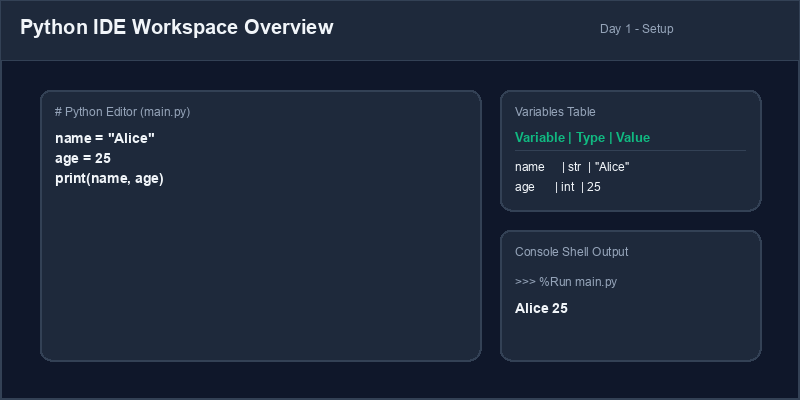
Python Shell: An interactive REPL console running Python code blocks on the fly.
2. Declaring Variables and Memory Allocation
In programming, a variable is a labeled storage container. More precisely, a variable is a reference name pointing to a memory address where a value is stored in your computer's RAM. Think of it as a label pinned to a box.
We declare a variable by typing its name, followed by the single assignment operator
(=), and the value we wish to store:
# Assignment format: variable_name = value
username = "Alice"
score = 42
temperature = 98.6
Python is a dynamically typed language. This means you do not need to explicitly declare what type of data a variable holds (like "string" or "integer"). Python inspects the value on the right-hand side and automatically creates the correct data type in memory.
When you reassign a variable to a new value of a different data type, Python simply moves the pointer to point to the new object in the memory heap:
x = 10       # x is an integer (int)
x = "hello"  # x is now a string (str) in memory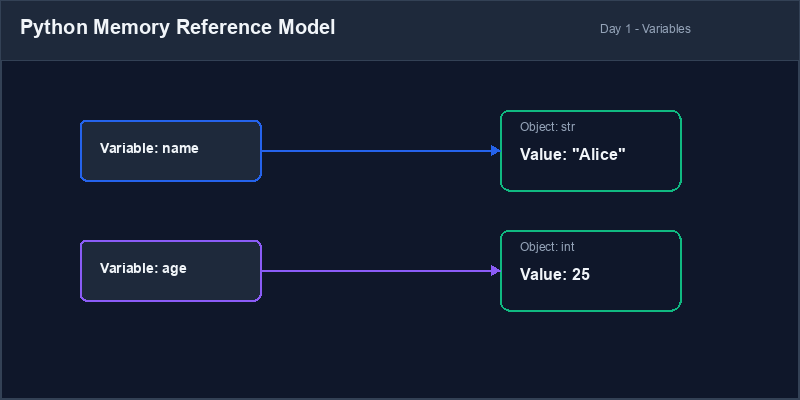
3. Fundamental Naming Rules and Conventions
When naming variables, you must adhere to Python's strict naming rules. Breaking these rules will
result in a SyntaxError:
- Variable names must start with a letter (a-z, A-Z) or an underscore (
_). They cannot start with a number (e.g.1st_scoreis illegal). - They can only contain alphanumeric characters and underscores (A-z, 0-9, and
_). No spaces, dashes, or punctuation. - Variable names are case-sensitive.
myScore,myscore, andMYSCOREare three completely different variables. - You cannot use Python's reserved keywords (such as
if,else,while,print,def) as variable names.
The standard convention in Python is to use snake_case for variable names: all
lowercase letters with words separated by underscores (e.g., user_age,
total_price, is_active_member). For constant values that do not change,
capitalize all letters (e.g., PI = 3.14159).
4. Distinguishing Basic Data Types
Python categorizes data into types to know how to interact with it. The three basic data types you will use daily are:
| Data Type | Python Tag | Definition & Details | Examples |
|---|---|---|---|
| Integer | int |
Whole numbers without decimals. Can be positive, negative, or zero. Supports infinite precision. | 10, -45, 0 |
| Float | float |
Real numbers with a decimal fraction. Under the hood, Python represents these as
double-precision floats. Can also use scientific notation (e.g. 1e-3 which is
0.001). |
3.14, -0.5, 100.0 |
| String | str |
Sequential Unicode text characters enclosed in quotes. Immutable. Supports empty layouts
(""). |
"Alice", 'py Course' |
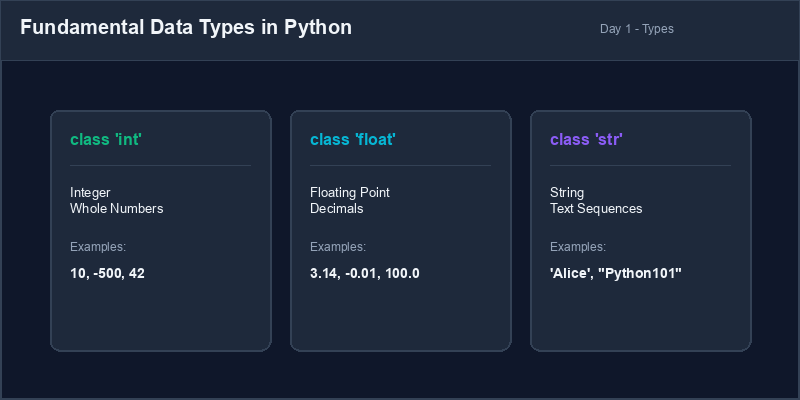
5. Script Execution Cycle
When you run a Python script file (script.py) from your editor, the Python interpreter
reads your code lines top-to-bottom sequentially. If it encounters a syntax rule violation, it stops
compiling immediately and raises an error traceback message before executing any lines of code. This
is why strict syntax and correct variable names are mandatory from Day 1.
Keyword Warning: Attempting to assign a value to a reserved word like
if = 5 will immediately cause a SyntaxError: invalid syntax. Check
your IDE's syntax highlighting: reserved keywords will usually change color to guide you.
1. التعرف على واجهة بيئة التطوير (Thonny و VS Code)
تتطلب كتابة الأكواد البرمجية برنامجاً متخصصاً يُسمى بيئة التطوير المتكاملة (IDE). خلال هذه الدورة، سنستخدم إما برنامج Thonny (محرر خفيف الوزن مصمم خصيصاً للمبتدئين) أو برنامج Visual Studio Code (VS Code) (محرر احترافي قوي ومتعدد الميزات).
دعونا نحدد المناطق الثلاث الرئيسية لبيئة التطوير الخاصة بك، كما هو موضح في مخطط واجهة العمل:
- محرر النصوص (Script Editor): هنا تقوم بكتابة وتعديل وحفظ ملفات أكواد بايثون. يجب
دائماً حفظ ملفات بايثون بالامتداد
.py(على سبيل المثال،script.py). تتيح لك كتابة الكود في المحرر بناء تعليمات برمجية معقدة ومتعددة الأسطر وتشغيلها دفعة واحدة. سيؤدي الضغط على مفتاح F5 أو النقر فوق زر "التشغيل" الأخضر إلى تنفيذ السكربت بالكامل. - مترجم بايثون التفاعلي (Interactive Shell / Console): يقع في الجزء السفلي، ويعرض مخرجات البرنامج والأخطاء البرمجية. يمكنك أيضاً كتابة أسطر فردية من كود بايثون مباشرة في نافذة الأوامر لتقييمها فورياً (REPL).
- مفتش المتغيرات ونطاق البيانات (Variables Inspector): توفر العديد من البيئات (مثل Thonny) لوحة تعرض المتغيرات النشطة حالياً، وأنواع بياناتها وقيمها، وهو أمر مفيد للغاية لتصور البيانات وتتبعها.
Python Shell (نافذة أوامر بايثون التفاعلية): كونسول تفاعلي يقوم بتشغيل كود بايثون بشكل فوري بمجرد إدخاله.
2. الإعلان عن المتغيرات وتخصيص الذاكرة (Memory Allocation)
في البرمجة، يعتبر المتغير (Variable) حاوية لتخزين البيانات. وبشكل أكثر دقة، المتغير هو اسم مرجعي يشير إلى عنوان محدد في الذاكرة العشوائية للكمبيوتر (RAM) حيث يتم حفظ القيمة. تخيل أنه ملصق يحمل اسماً موضوعاً على صندوق.
نقوم بالإعلان عن متغير عن طريق كتابة اسمه، يليه معامل التخصيص الفردي (=)، ثم القيمة التي
نريد تخزينها:
# صيغة التخصيص: اسم_المتغير = القيمة
username = "Alice"
score = 42
temperature = 98.6
لغة بايثون هي لغة ديناميكية تحديد النوع (Dynamically Typed). هذا يعني أنك لا تحتاج إلى تحديد نوع البيانات التي يحملها المتغير صراحة (مثل "نص" أو "رقم صحيح"). تبحث بايثون في القيمة الموجودة على الجانب الأيمن وتنشئ نوع البيانات المناسب تلقائياً في الذاكرة.
عندما تعيد تخصيص متغير لقيمة جديدة بنوع بيانات مختلف، تقوم بايثون ببساطة بنقل المؤشر ليشير إلى الكائن الجديد في الذاكرة:
x = 10       # x هو عدد صحيح (int) حالياً
x = "hello" # x يشير الآن إلى نص (str) في الذاكرة3. القواعد والاصطلاحات الأساسية لتسمية المتغيرات
عند تسمية المتغيرات، يجب الالتزام بقواعد تسمية بايثون الصارمة. سيؤدي خرق هذه القواعد إلى حدوث خطأ في
الكود (SyntaxError):
- يجب أن تبدأ أسماء المتغيرات بحرف (a-z، A-Z) أو شرطة سفلية (
_). لا يمكن أن تبدأ برقم (على سبيل المثال1st_scoreغير قانونية). - يمكنها فقط احتواء الأحرف الأبجدية الرقمية والشرطات السفلية (A-z، 0-9، و
_). لا يُسمح بالمسافات أو الشرطات العادية أو علامات الترقيم. - أسماء المتغيرات حساسة لحالة الأحرف (Case-Sensitive). المتغيرات
myScoreوmyscoreوMYSCOREهي ثلاثة متغيرات مختلفة تماماً. - لا يمكنك استخدام الكلمات المحجوزة في بايثون (مثل
if،else،while،print،def) كأسماء متغيرات.
العرف القياسي في بايثون هو كتابة أسماء المتغيرات بصيغة snake_case: أحرف صغيرة
بالكامل مع فصل الكلمات بشرطات سفلية (مثال: user_age، total_price). للثوابت
التي لا تتغير قيمتها، نستخدم أحرفاً كبيرة بالكامل (مثال: PI = 3.14159).
4. التمييز بين أنواع البيانات الأساسية
تصنف بايثون البيانات إلى أنواع لمعرفة كيفية التفاعل معها. أنواع البيانات الأساسية الثلاثة التي ستستخدمها يومياً هي:
| نوع البيانات | اسم النوع في بايثون | التعريف والتفاصيل | أمثلة |
|---|---|---|---|
| عدد صحيح (Integer) | int |
أرقام كاملة بدون كسور عشرية. يمكن أن تكون موجبة أو سالبة أو صفراً. تدعم دقة غير محدودة. | 10, -45, 0 |
| عدد عشري (Float) | float |
أعداد حقيقية تحتوي على كسر عشري. تدعم أيضاً الترميز العلمي (مثل 1e-3 وهو 0.001).
|
3.14, -0.5, 100.0 |
| النصوص (String) | str |
سلسلة متتالية من الأحرف النصية المحاطة بعلامات اقتباس فردية أو مزدوجة. غير قابلة للتعديل مباشرة. | "Alice", 'py Course' |
5. دورة تنفيذ الأكواد البرمجية (Execution Cycle)
عند تشغيل سكربت بايثون (script.py) من محرر النصوص الخاص بك، يقرأ مفسر بايثون أسطر الكود
بشكل متتالي من الأعلى إلى الأسفل. إذا واجه خرقاً لقواعد الصياغة، فإنه يتوقف فوراً ويعرض رسالة الخطأ
وتتبع مكانها دون تنفيذ أي أسطر تالية. ولهذا السبب، فإن الالتزام الدقيق بقواعد النحو وتسمية المتغيرات
أمر إلزامي منذ اليوم الأول.
تحذير الكلمات المحجوزة: محاولة تخصيص قيمة لكلمة محجوزة مثل if = 5
ستؤدي فوراً لخطأ في البنية SyntaxError: invalid syntax. انتبه لتلوين الكلمات في
بيئتك البرمجية؛ فالكلمات المحجوزة ستغير لونها لتنبيهك.
User Profile Constructor بناء ملف تعريف المستخدم
Write a script that creates variables to store details for a student. Design your variables with proper naming conventions and print their outputs:
- Create a variable
student_nameand assign it a string value. - Create a variable
gpaand assign it a floating-point number. - Create a variable
completed_hoursand assign it an integer value. - Use the
print()function to display each variable along with a descriptive label.
اكتب برنامجاً يقوم بإنشاء متغيرات لتخزين تفاصيل طالب معين. صمم متغيراتك باتباع قواعد التسمية الصحيحة واطبع مخرجاتها:
- أنشئ متغيراً باسم
student_nameوخصص له قيمة نصية (اسم الطالب). - أنشئ متغيراً باسم
gpaوخصص له عدداً عشرياً (المعدل التراكمي). - أنشئ متغيراً باسم
completed_hoursوخصص له عدداً صحيحاً (الساعات المكتملة). - استخدم دالة الطباعة
print()لعرض قيم كل متغير مع كتابة مسمى توضيحي بجانبه.
Model Answer (Python Code)
الإجابة النموذجية (كود بايثون)
# Step 1: Assign variables using correct naming rules
student_name = "Marcus Aurelius"
gpa = 3.92
completed_hours = 45

# Step 2: Print variables with descriptive labels
print("Student Name:", student_name)
print("GPA:", gpa)
print("Hours Completed:", completed_hours)

# Step 3: Inspect types (optional but good practice)
print("Type of student_name:", type(student_name))
print("Type of gpa:", type(gpa))
print("Type of completed_hours:", type(completed_hours))
Run the code above in your Thonny or VS Code IDE. Inspect variable outputs and logic flow to ensure it behaves exactly as described. قم بتشغيل الكود أعلاه في بيئة Thonny أو VS Code. تتبع مخرجات المتغيرات ومسار المنطق للتأكد من عمل الكود بالشكل الصحيح.