Conditional Logic (If/Else) المنطق الشرطي والتحقق من الشروط (If/Else)
Learning Outcomes مخرجات التعلم
- Construct basic 'if' statements to control program flow based on rules.
- Implement 'else' statements for alternative execution paths.
- Evaluate comparison operators (==, !=, <,>, <=,>=) to compare values.
- Trace execution paths of simple conditional logic to predict output.
- بناء جمل شرطية أساسية باستخدام 'if' للتحكم في مسار تنفيذ البرنامج بناءً على شروط محددة.
- تطبيق جملة البديل 'else' لتحديد مسارات بديلة لتنفيذ الأكواد.
- تقييم معاملات المقارنة الحسابية (==، !=، <،>، <=،>=) للمقارنة بين القيم.
- تتبع مسارات تنفيذ الجمل الشرطية البسيطة يدوياً لتوقع المخرجات بدقة.
1. Program Flow and If-Else Statements
By default, Python runs statements line-by-line from top to bottom. However, we often want our program to make decisions and execute certain lines only if a specific condition is met. This is called **conditional logic**.
The **if statement** tests a boolean condition. If the condition is True, Python
executes the indented block of code directly underneath it. If the condition is False,
the block is skipped. The optional **else statement** specifies a backup block of code to run only if
the condition evaluates to False.
# Simple if-else decision
age = 20
if age >= 18:
    print("You are an adult.") # Runs if age >= 18 is True
else:
    print("You are a minor.") # Runs if age >= 18 is False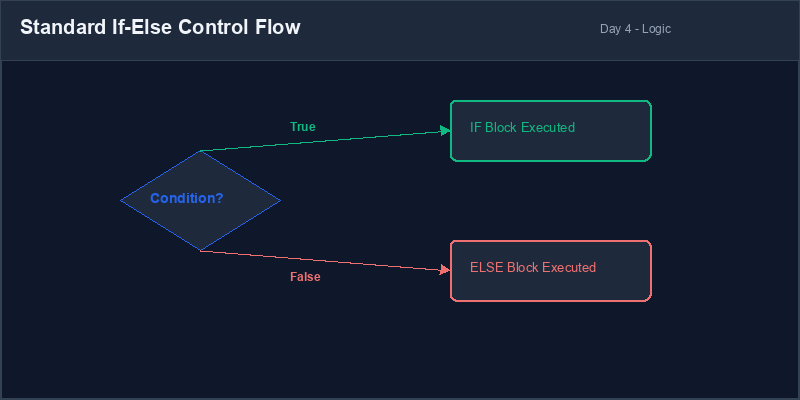
True
or False.Indentation: The empty spaces (usually 4 spaces or 1 tab) at the start of a line. In Python, indentation defines which block of code belongs to a conditional statement or loop.
2. Comparison Operators
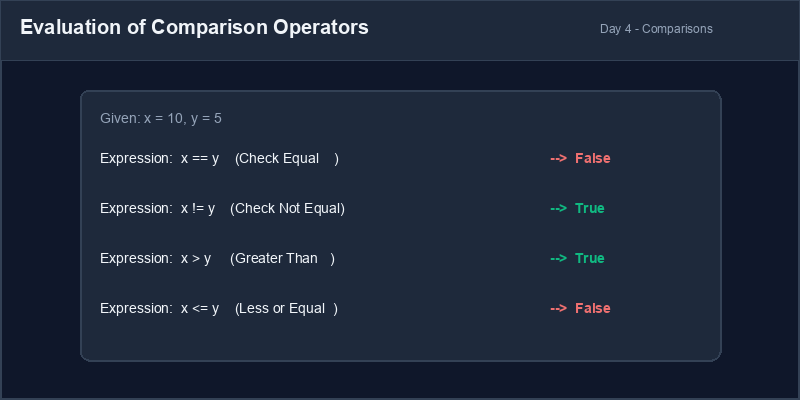
To compare values, we use **comparison operators**. These operators compare the left and right values and return a boolean result:
| Operator | Meaning | Example (x=10, y=5) | Result |
|---|---|---|---|
== |
Equal to | x == y |
False |
!= |
Not equal to | x != y |
True |
> |
Greater than | x > y |
True |
< |
Less than | x < y |
False |
>= |
Greater than or equal to | x >= 10 |
True |
<= |
Less than or equal to | x <= 5 |
False |
3. Tracing Conditional Executions Step-by-Step
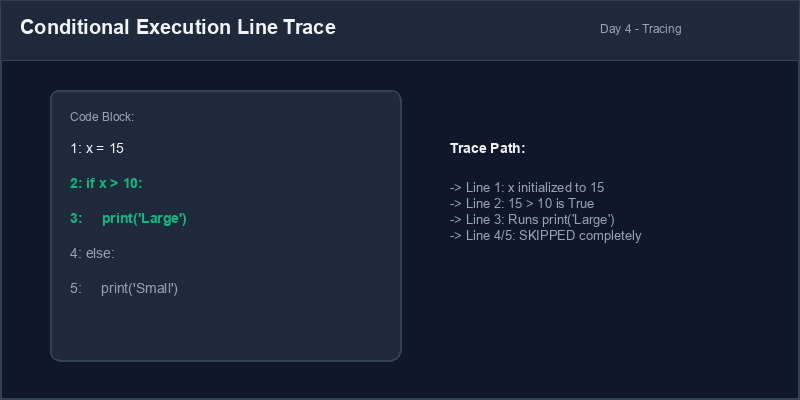
To write reliable code, you must learn to trace program executions manually. This involves reading the code line-by-line and keeping track of variable values and whether active branches are triggered or skipped.
Assignment vs Comparison: Do not confuse the assignment operator
(=) with the equality comparison operator (==). Writing
if score = 100: will cause a SyntaxError: invalid syntax. Always use
double equals (==) to compare equality.
4. Spotting Indentation Bugs
Python relies heavily on correct indentation to group statements. Failing to align indented blocks
properly will result in an IndentationError.
# Missing indentation for conditional body
temp = 32
if temp > 30:
print("It is hot outside!") # Crashes!
else:
print("Normal weather")temp = 32
if temp > 30:
print("It is hot outside!") # 4 spaces indent
else:
print("Normal weather") # 4 spaces indent1. مسار تنفيذ البرنامج والجمل الشرطية (If-Else)
بشكل افتراضي، تقوم بايثون بتشغيل الأكواد البرمجية سطراً بسطر من الأعلى إلى الأسفل. ومع ذلك، نحتاج كثيراً إلى جعل برامجنا تتخذ قرارات وتقوم بتشغيل أسطر معينة فقط إذا تحقق شرط محدد. هذا ما يُعرف بـ المنطق الشرطي.
تقوم جملة if باختبار شرط منطقي. إذا كان الشرط True، ينفذ مفسر بايثون
كتلة الكود المحازاة للداخل مباشرة تحتها. وإذا كان الشرط False، يتم تجاهل هذه الكتلة
بالكامل. وتحدد جملة else الاختيارية كتلة كود بديلة يتم تشغيلها فقط إذا كان الشرط
False.
# قرار بسيط باستخدام if-else
age = 20
if age >= 18:
    print("You are an adult.") # يعمل إذا كان العمر أكبر من أو يساوي 18
else:
print("You are a minor.") # يعمل إذا كان الشرط السابق خاطئاًTrue
(صحيح) أو False (خاطئ).الإزاحة أو المحاذاة (Indentation): الفراغات البيضاء (غالباً 4 مسافات) في بداية السطر البرمجي. في بايثون، تُستخدم الإزاحة لتحديد تبعية الكود للشرط أو التكرار.
2. معاملات المقارنة (Comparison Operators)
للمقارنة بين القيم، نستخدم معاملات المقارنة. تقارن هذه المعاملات بين القيمتين اليمنى واليسرى وتخرج قيمة منطقية:
| المعامل | المعنى | مثال (x=10, y=5) | النتيجة |
|---|---|---|---|
== |
يساوي | x == y |
False |
!= |
لا يساوي | x != y |
True |
> |
أكبر من | x > y |
True |
< |
أصغر من | x < y |
False |
>= |
أكبر من أو يساوي | x >= 10 |
True |
<= |
أصغر من أو يساوي | x <= 5 |
False |
3. تتبع تنفيذ الشروط خطوة بخطوة
لكتابة كود يعتمد عليه، يجب أن تتعلم كيفية تتبع تنفيذ البرامج يدوياً. يتضمن ذلك قراءة الكود سطراً بسطر وتحديث قيم المتغيرات في ذهنك ومراقبة ما إذا كانت المسارات الشرطية ستنفذ أم سيتم تخطيها.
التخصيص مقابل المقارنة: لا تخلط بين معامل التخصيص الفردي (=) ومعامل
مقارنة التساوي المزدوج (==). كتابة if score = 100: ستؤدي لخطأ في البنية
SyntaxError: invalid syntax. استخدم دائماً == للتحقق من التساوي.
4. اكتشاف أخطاء الإزاحة (Indentation Bugs)
تعتمد بايثون كلياً على الإزاحة لتحديد مجموعات الأسطر التابعة للشروط. الفشل في ضبط المسافات سيؤدي
فوراً لخطأ في التشغيل IndentationError.
# غياب الإزاحة لسطر الطباعة التابع للشرط
temp = 32
if temp > 30:
print("It is hot outside!") # يتوقف الكود هنا بسبب خطأ!
else:
print("Normal weather")temp = 32
if temp > 30:
print("It is hot outside!") # 4 مسافات إزاحة
else:
print("Normal weather") # 4 مسافات إزاحةInteractive Guard System نظام التدقيق الأمني للبوابة
Build a simple threshold checker. Capture a user's numerical input and check if they meet a required score requirement:
- Create a variable
passing_scoreand assign it the integer 70. - Ask the user to enter their score using
input(). - Validate the input using
isdigit()and cast it to an integer. If invalid, notify the user. - Compare their score to the passing score:
- If their score is greater than or equal to
passing_score, print "Congratulations, you passed!". - Otherwise, print "Sorry, you did not pass. Keep studying!".
- If their score is greater than or equal to
اكتب برنامجاً بسيطاً للتحقق من درجة اجتياز الامتحان. استقبل درجة المستخدم من لوحة التحكم وتحقق من تخطيها للحد المطلوب:
- أنشئ متغيراً باسم
passing_scoreوعين له القيمة 70. - اطلب من المستخدم إدخال درجته باستخدام
input(). - تحقق من صلاحية المدخل باستخدام
isdigit()ثم حوله لعدد صحيح. إذا كان غير صالح، اعرض رسالة تنبيه. - قارن درجة المستخدم مع درجة الاجتياز:
- إذا كانت درجة المستخدم أكبر من أو تساوي
passing_score، اطبع "تهانينا، لقد اجتزت!". - خلاف ذلك، اطبع "نأسف، لم تجتز الامتحان. استمر في الدراسة!".
- إذا كانت درجة المستخدم أكبر من أو تساوي
Model Answer (Python Code)
الإجابة النموذجية (كود بايثون)
# Step 1: Set passing threshold
passing_score = 70

# Step 2: Capture user score
score_input = input("Enter your exam score (0-100): ")

# Step 3: Validate and process logic
if score_input.isdigit():
    user_score = int(score_input)

    # Step 4: Conditional threshold check
    if user_score >= passing_score:
        print("Congratulations, you passed!")
    else:
        print("Sorry, you did not pass. Keep studying!")
else:
    print("Invalid Input: Please enter an integer number representing your score.")
Run the code above in your Thonny or VS Code IDE. Inspect variable outputs and logic flow to ensure it behaves exactly as described. قم بتشغيل الكود أعلاه في بيئة Thonny أو VS Code. تتبع مخرجات المتغيرات ومسار المنطق للتأكد من عمل الكود بالشكل الصحيح.