Exception Handling and Valid Cases معالجة الأخطاء والاستثناءات البرمجية
Learning Outcomes مخرجات التعلم
- Anticipate common exceptions (like ValueError) caused by user entry.
- Implement 'try' and 'except' blocks to handle exceptions gracefully.
- Write clear error messages guiding the user to provide valid data.
- Combine loops and error handling to enforce strict input rules.
- توقع الأخطاء والاستثناءات البرمجية الشائعة (مثل ValueError) الناتجة عن مدخلات المستخدم.
- تطبيق جمل 'try' و 'except' لمعالجة الاستثناءات البرمجية وتفادي توقف البرنامج.
- كتابة رسائل خطأ واضحة وموجهة لمساعدة المستخدم على إدخال بيانات صحيحة.
- دمج حلقات التكرار ومعالجة الأخطاء لفرض قواعد صارمة على صحة البيانات المدخلة.
1. Anticipating Exceptions and Runtime Crashes
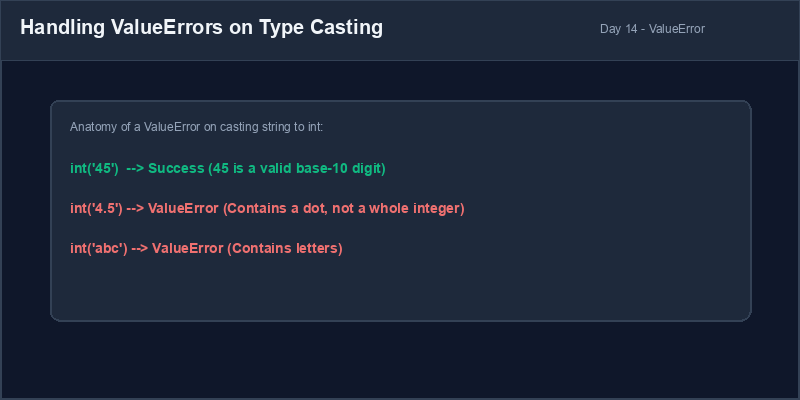
Even if your code is syntactically perfect, it can still crash at runtime. A crash that occurs while
the program is running is called an **exception**. A common cause of exceptions is unexpected user
entry. For example, if a user enters a decimal or text when you ask for an integer, the program will
throw a ValueError and halt immediately.
Try-Except Block: A control structure used to intercept (catch) exceptions and run safety code rather than crashing.
2. The Try-Except Statement
To prevent crashes, we wrap risky code in a **try-except** block. When Python enters a
try block, it monitors for exceptions. If an exception occurs, Python stops running the
code inside the try block immediately and jumps straight to the corresponding
except block to run safety recovery steps.
try:
    age = int(input("Enter integer age: ")) # Risky cast
    print(f"Age recorded: {age}")
except ValueError:
    print("Error: That was not a valid integer!") # Executed if casting fails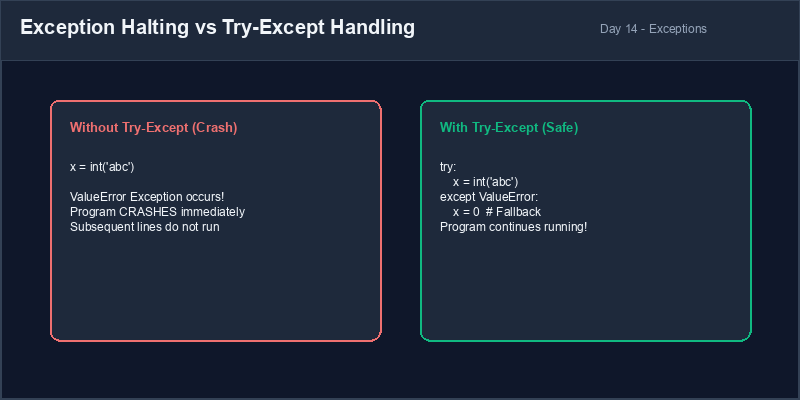
3. Robust Input Validation Loops
We can combine while True loops and try-except blocks to create a **robust
input validation loop**. This pattern keeps prompting the user for input until the conversion
succeeds, at which point the break statement exits the loop safely.
# Robust validation template
while True:
    try:
        score = int(input("Enter exam score (0-100): "))
        if 0 <= score <= 100:
            break # Exit loop if score is valid and in range
        else:
            print("Score must be between 0 and 100.")
    except ValueError:
        print("Invalid input! Please enter a whole number.")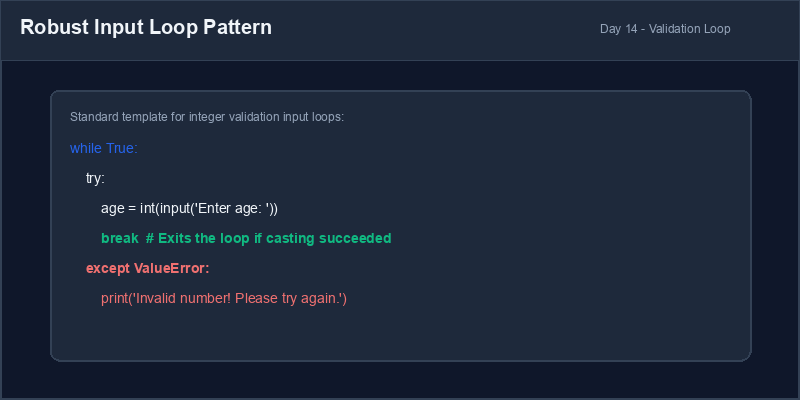
Narrow Exception Handling: Always specify the exact exception you want to handle
(such as except ValueError:) rather than using a bare except:. A bare
except can hide unexpected errors, making bugs very hard to diagnose.
4. Resolving Crash-Prone Conversions
Avoid raw casting inputs. Shield conversion statements in try-except structures to ensure app stability.
# Program crashes if user inputs non-numbers
price_in = input("Price: ")
price = float(price_in)
print(f"Price is {price}")price_in = input("Price: ")
try:
price = float(price_in)
print(f"Price is {price}")
except ValueError:
print("Invalid price. Set to 0.0")
price = 0.01. توقع الاستثناءات وأخطاء التشغيل المفاجئة
حتى لو كان كودك البرمجي مكتوباً بشكل صحيح نحوياً، فقد يتوقف فجأة أثناء التشغيل. يسمى الخطأ الذي يحدث
أثناء تشغيل البرنامج بـ الاستثناء (Exception). وأحد الأسباب الشائعة للاستثناءات هو
مدخلات المستخدم غير المتوقعة. على سبيل المثال، إذا أدخل المستخدم نصاً بينما طلب منه البرنامج إدخال عدد
صحيح، سيقوم مفسر بايثون بإطلاق خطأ ValueError ويتوقف البرنامج فوراً.
كتلة Try-Except: بنية برمجية تُستخدم لاعتراض وتلقي الاستثناءات وتشغيل كود حماية بديل بدلاً من توقف البرنامج كلياً.
2. استخدام كتلة Try-Except لمعالجة الأخطاء
لمنع توقف البرامج، نضع الأكواد الحساسة والمعرضة للأخطاء داخل كتلة try-except. عندما
يبدأ المفسر في تنفيذ سطر try، فإنه يراقب الأخطاء. وإذا حدث خطأ ما، يتوقف التنفيذ داخل
try فوراً وينتقل المفسر مباشرة لكتلة except لتنفيذ إجراءات الحماية والبدائل.
try:
    age = int(input("Enter integer age: ")) # تحويل حساس
    print(f"Age recorded: {age}")
except ValueError:
print("Error: That was not a valid integer!") # ينفذ فقط إذا فشل التحويل الرقمي3. حلقة تكرار التحقق القوية من المدخلات
يمكننا دمج حلقة التكرار اللانهائية while True مع كتلة try-except لإنشاء
حلقة تحقق قوية. يستمر هذا النموذج في مطالبة المستخدم بالإدخال حتى ينجح التحويل الرقمي
دون أخطاء، وعندها يكسر أمر break الحلقة ويخرج منها بأمان.
# نموذج حلقة التحقق القوية
while True:
    try:
        score = int(input("Enter exam score (0-100): "))
        if 0 <= score <= 100:
            break # اخرج من الحلقة إذا كان الرقم صحيحاً وضمن النطاق
        else:
            print("Score must be between 0 and 100.")
    except ValueError:
print("Invalid input! Please enter a whole number.")تحديد نوع الاستثناء: حدد دائماً نوع الخطأ الذي تريد معالجته (مثل
except ValueError:) بدلاً من كتابة except: عامة ومجردة. فقد يخفي
الاستدعاء العام أخطاء أخرى غير متوقعة ويصعب تصحيحها.
4. إصلاح الأكواد المعرضة للتوقف المفاجئ
تجنب التحويل المباشر لمدخلات المستخدم دون حماية. قم بإحاطة عمليات التحويل بكتل try-except لضمان استقرار تشغيل التطبيق.
# يتوقف البرنامج إذا أدخل المستخدم حرفاً
price_in = input("Price: ")
price = float(price_in)
print(f"Price is {price}")price_in = input("Price: ")
try:
price = float(price_in)
print(f"Price is {price}")
except ValueError:
print("Invalid price. Set to 0.0")
price = 0.0Divide by Zero Shield درع الحماية من القسمة على الصفر
Write a script that divides a constant total (e.g. 100) by a user-provided integer. Handle both value errors and division-by-zero exceptions:
- Create a variable
total_amountand set it to 100. - Ask the user to enter a number of divisions using
input(). - Write a
try-exceptblock:- Inside `try`: Cast the input to an integer, calculate
result = total_amount / divisions, and print it. - Handle
ValueError: Print a message warning the user to enter whole numbers only. - Handle
ZeroDivisionError: Print a message explaining that division by zero is mathematically impossible.
- Inside `try`: Cast the input to an integer, calculate
اكتب برنامجاً يقوم بقسمة قيمة ثابتة (مثلاً 100) على عدد صحيح يدخله المستخدم. تعامل مع أخطاء القيم وأخطاء القسمة على صفر:
- أنشئ متغيراً باسم
total_amountوعين له القيمة 100. - اطلب من المستخدم إدخال عدد مرات التقسيم باستخدام
input(). - اكتب كتلة
try-exceptللتحقق:- داخل
try: حول المدخل لعدد صحيح، واحسب ناتج القسمةresult = total_amount / divisions، واطبعه. - عالج استثناء
ValueError: اطبع رسالة تحذير تطالب المستخدم بإدخال أرقام صحيحة فقط. - عالج استثناء
ZeroDivisionError: اطبع رسالة توضح أن القسمة على صفر مستحيلة رياضياً.
- داخل
Model Answer (Python Code)
الإجابة النموذجية (كود بايثون)
# Step 1: Initialize constant
total_amount = 100

# Step 2: Capture user divisions
divisions_in = input("Enter number of splits: ")

# Step 3: Implement try-except with multiple exception handlers
try:
    splits = int(divisions_in)
    result = total_amount / splits
    print(f"Result: {total_amount} split {splits} ways is {result}")
except ValueError:
    print("Error: Input must be a valid integer number.")
except ZeroDivisionError:
    print("Error: You cannot split by zero! Division by zero is undefined.")
Run the code above in your Thonny or VS Code IDE. Inspect variable outputs and logic flow to ensure it behaves exactly as described. قم بتشغيل الكود أعلاه في بيئة Thonny أو VS Code. تتبع مخرجات المتغيرات ومسار المنطق للتأكد من عمل الكود بالشكل الصحيح.