Mini-Project: Integration & Debugging المشروع البرمجي المتكامل وتصحيح الأخطاء
Learning Outcomes مخرجات التعلم
- Analyze a mini-project requirement to design a programmatic solution.
- Integrate variables, loops, conditionals, and custom functions into one script.
- Use lists and dictionaries systematically to manage the project's data.
- Trace execution and debug the final project to ensure it handles all invalid cases.
- تحليل متطلبات مشروع برمجي مصغر لتصميم حل تقني متكامل.
- دمج المتغيرات، والحلقات، والشروط، والدوال البرمجية المخصصة في سكربت واحد.
- استخدام القوائم والقواميس بشكل منظم ومنهجي لإدارة وتخزين بيانات المشروع.
- تتبع مسار التنفيذ وتصحيح الأخطاء البرمجية للمشروع لضمان استقرار التطبيق ضد المدخلات الخاطئة.
1. Mini-Project Requirements and Architecture
Congratulations on reaching Day 15! In this final lesson, we will integrate everything we have learned—variables, data types, arithmetic, conditional logic, loops, lists, dictionaries, custom functions, and exception handling—into a single, robust application: **A Student Grade Tracker**.
Before writing code, we must map out our application's architecture. A professional application is organized into three distinct layers:
- Main Menu Loop: A persistent control loop that displays choice options to the user and calls the appropriate functions.
- Operations Logic: Dedicated helper functions to add student data, calculate average grades, and view records.
- Data Storage: A central data structure (a list of dictionaries) to represent student files.
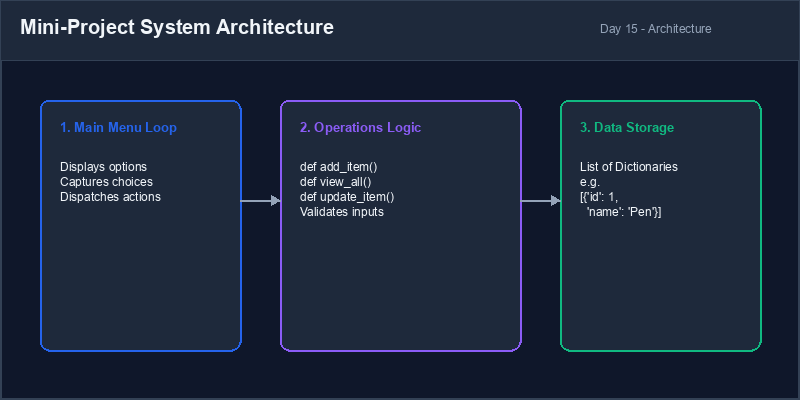
Graceful Termination: Allowing the user to exit the program loop cleanly without raising errors or freezing.
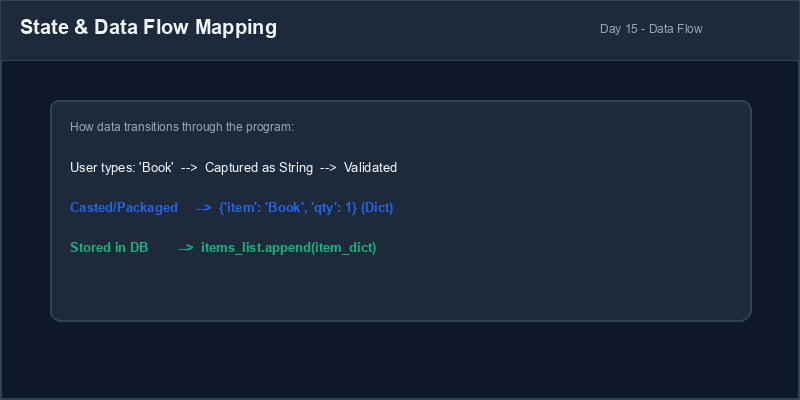
2. Integrated State and Data Transitions
It is important to understand how data moves through our system during execution. When a user enters data, it is initially captured as a string, validated, converted, packaged into a dictionary record, and finally appended to our global list database.
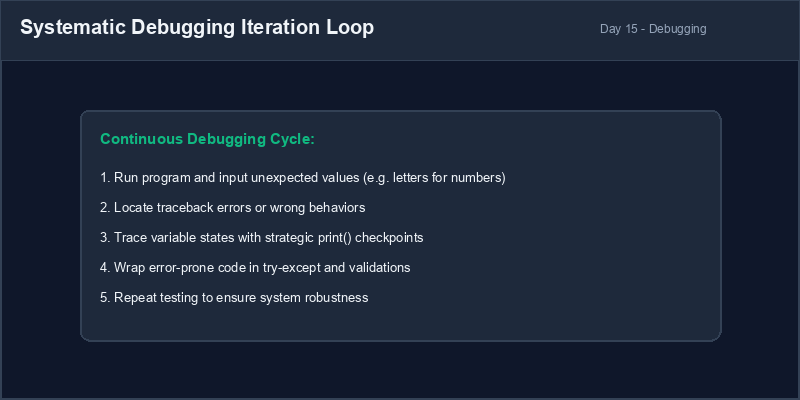
3. The Systematic Debugging Cycle
As you build more complex applications, errors will inevitably arise. Rather than guessing, adopt a systematic debugging discipline to isolate, identify, and resolve bugs efficiently.
Scope Safety: Keep your database lists outside of your operations functions in the global scope, but pass them as arguments to keep your functions modular and testable.
4. Resolving Unvalidated Calculation Bugs
Always verify database state before performing calculations. For example, trying to compute average
scores on an empty student list will crash your program with a ZeroDivisionError.
# Crashes if student list is empty!
students = []
total = sum([s["grade"] for s in students])
avg = total / len(students) # ZeroDivisionError!students = []
if len(students) > 0:
total = sum([s["grade"] for s in students])
avg = total / len(students)
else:
avg = 0.0 # Safe default fallback
print("No students recorded yet.")1. متطلبات وبنية نظام المشروع المصغر
تهانينا لوصولك لليوم الخامس عشر! في هذا الدرس الختامي، سنقوم بدمج كل ما تعلمناه طوال هذه الدورة—المتغيرات، أنواع البيانات، العمليات الحسابية، الشروط، الحلقات، القوائم، القواميس، الدوال البرمجية، ومعالجة الاستثناءات—في تطبيق برمجية واحد متماسك وقوي: برنامج تتبع درجات الطلاب.
قبل الشروع في كتابة الكود، يجب علينا رسم واجهة وهيكلية نظام التطبيق. ينظم التطبيق الاحترافي إلى ثلاث طبقات رئيسية:
- حلقة القائمة الرئيسية (Main Menu Loop): حلقة تكرار مستمرة تعرض للمستخدم خيارات التحكم وتستدعي الدوال المناسبة.
- المنطق التشغيلي (Operations Logic): دوال مساعدة مخصصة لإضافة بيانات الطالب، حساب متوسط الدرجات، وعرض السجلات.
- مخزن البيانات (Data Storage): هيكل بيانات مركزي (قائمة تحتوي قواميس) لتمثيل وحفظ سجلات الطلاب.
الخروج الآمن (Graceful Termination): السماح للمستخدم بإنهاء حلقة عمل البرنامج بشكل نظيف دون حدوث أخطاء أو تجميد للنظام.
2. تدفق البيانات وحالات الانتقال في النظام
من المهم فهم كيفية انتقال وتغير البيانات في نظامنا أثناء التشغيل. عندما يدخل المستخدم البيانات، يتم استقبالها كنص أولاً، ثم التحقق منها، وتحويلها رقمياً، ثم تعبئتها في قاموس يمثل السجل، وأخيراً إضافتها لقاعدة بيانات القائمة العامة.
3. منهجية التتبع المنظم وتصحيح الأخطاء
كلما أصبحت البرمجيات أكثر تعقيداً، زادت احتمالية حدوث الأخطاء. بدلاً من التخمين العشوائي، اتبع منهجية منظمة لتصحيح وتحديد وحل الأخطاء بكفاءة.
أمان نطاق قاعدة البيانات: احرص على تعريف قائمة قاعدة البيانات خارج نطاق الدوال (في النطاق العام)، ولكن مررها كمعامل للدوال المساعدة للحفاظ على تصميم برمجية جزئي ونظيف.
4. إصلاح أخطاء العمليات الحسابية غير المحمية
تحقق دائماً من حالة البيانات قبل البدء في العمليات الحسابية. على سبيل المثال، محاولة حساب متوسط درجات
قائمة طلاب فارغة ستؤدي لتوقف البرنامج فوراً بسبب خطأ القسمة على الصفر ZeroDivisionError.
# يتوقف البرنامج إذا كانت قائمة الطلاب فارغة!
students = []
total = sum([s["grade"] for s in students])
avg = total / len(students) # ZeroDivisionError!students = []
if len(students) > 0:
total = sum([s["grade"] for s in students])
avg = total / len(students)
else:
avg = 0.0 # قيمة بديلة آمنة
print("No students recorded yet.")Student Grade Tracker نظام تتبع درجات الطلاب
Build the complete Student Grade Tracker. Implement the main loop, operations logic, and data storage structures as defined:
- Create a global list named
student_databaseto store student dictionaries. - Define a function
add_student(db):- Prompts for student name.
- Prompts for grade (using robust input validation to ensure it's a valid float between 0 and 100).
- Saves the record as a dictionary
{"name": name, "grade": grade}and appends it to the database.
- Define a function
calculate_average(db)that returns the average grade of all students. Return 0.0 if empty. - Define a function
view_students(db)that prints all student names and their grades. - Build the main menu loop that coordinates these options. Test it for invalid inputs and zero divisions!
اكتب برنامجاً كاملاً لإدارة وتتبع درجات الطلاب. طبق القائمة الرئيسية، والمنطق التشغيلي، وهياكل التخزين كما يلي:
- أنشئ قائمة عامة باسم
student_databaseلتخزين قواميس سجلات الطلاب. - عرف دالة باسم
add_student(db):- تطلب اسم الطالب من المستخدم.
- تطلب الدرجة (باستخدام حلقة تحقق قوية لضمان إدخال رقم عشري صالح بين 0 و 100).
- تحفظ السجل كقاموس بالصيغة
{"name": name, "grade": grade}وتضيفه لقاعدة البيانات.
- عرف دالة باسم
calculate_average(db)تقوم بحساب وإرجاع متوسط درجات الطلاب. وتعيد القيمة 0.0 إذا كانت قاعدة البيانات فارغة. - عرف دالة باسم
view_students(db)تقوم بطباعة أسماء ودرجات جميع الطلاب المسجلين. - ابنِ حلقة القائمة الرئيسية لتنسيق هذه الخيارات. اختبر كودك ضد المدخلات الخاطئة والقسمة على صفر!
Model Answer (Python Code)
الإجابة النموذجية (كود بايثون)
# central data storage
student_database = []

# helper functions
def add_student(db):
    name = input("Enter student name: ").strip()
    if not name:
        print("Error: Name cannot be empty!")
        return

    # robust float validation loop
    while True:
        try:
            grade_in = input(f"Enter grade for {name} (0-100): ")
            grade = float(grade_in)
            if 0 <= grade <= 100:
                break
            else:
                print("Error: Grade must be between 0 and 100.")
        except ValueError:
            print("Invalid input! Please enter a valid decimal number.")

    # package and append record
    student_record = {"name": name, "grade": grade}
    db.append(student_record)
    print(f"Success: {name} added to database.")

def calculate_average(db):
    if len(db) == 0:
        return 0.0 # Safe fallback for zero division

    total_sum = 0
    for student in db:
        total_sum += student["grade"]
    return total_sum / len(db)

def view_students(db):
    if len(db) == 0:
        print("
Database is empty. No students recorded yet.")
        return

    print("
--- STUDENT RECORDS ---")
    for idx, student in enumerate(db):
        print(f"{idx + 1}. Name: {student['name'].ljust(15)} | Grade: {student['grade']}")
    print("-----------------------")

# main menu loop
while True:
    print("
==============================")
    print("  STUDENT GRADE TRACKER SYSTEM")
    print("==============================")
    print("1. Add Student Record")
    print("2. View All Student Records")
    print("3. Calculate Class Average")
    print("4. Exit Program")
    print("==============================")

    choice = input("Enter option (1-4): ").strip()

    if choice == "1":
        add_student(student_database)
    elif choice == "2":
        view_students(student_database)
    elif choice == "3":
        avg = calculate_average(student_database)
        print(f"
Class average grade: {avg:.2f}")
    elif choice == "4":
        print("Goodbye!")
        break
    else:
        print("Invalid option. Please choose 1, 2, 3, or 4.")
Run the code above in your Thonny or VS Code IDE. Inspect variable outputs and logic flow to ensure it behaves exactly as described. قم بتشغيل الكود أعلاه في بيئة Thonny أو VS Code. تتبع مخرجات المتغيرات ومسار المنطق للتأكد من عمل الكود بالشكل الصحيح.