Defining and Calling Functions تعريف واستدعاء الدوال البرمجية (Functions)
Learning Outcomes مخرجات التعلم
- Define custom functions using the 'def' keyword to group logic.
- Call custom functions to execute reusable blocks of code.
- Recognize the benefits of modular programming for debugging and readability.
- Explain the difference between local and global variable scope.
- تعريف دوال برمجية مخصصة باستخدام الكلمة المفتاحية 'def' لتجميع العمليات المنطقية.
- استدعاء الدوال البرمجية لتنفيذ كتل الأكواد القابلة لإعادة الاستخدام.
- إدراك فوائد البرمجة الجزئية (Modular Programming) في تتبع الأخطاء وسهولة القراءة.
- شرح الفرق بين نطاق المتغيرات المحلي (Local Scope) والنطاق العام (Global Scope).
1. Declaring and Executing Functions
As programs grow larger, writing everything in one long script becomes messy and hard to manage. We solve this by grouping related blocks of code into named packages called **functions**. Functions promote code reuse and make programs modular.
We define a function using the keyword def, followed by the function's name, parentheses
(), and a colon. The code inside the function must be indented. Defining a function does
**not** execute it. To run the code, we must explicitly **call** the function by writing its name
followed by parentheses.
# Defining the function
def show_welcome():
    print("Welcome to Tech Zero!")
    print("Let's learn Python together.")

# Calling the function to execute it
show_welcome() # Program jumps here, runs, and returns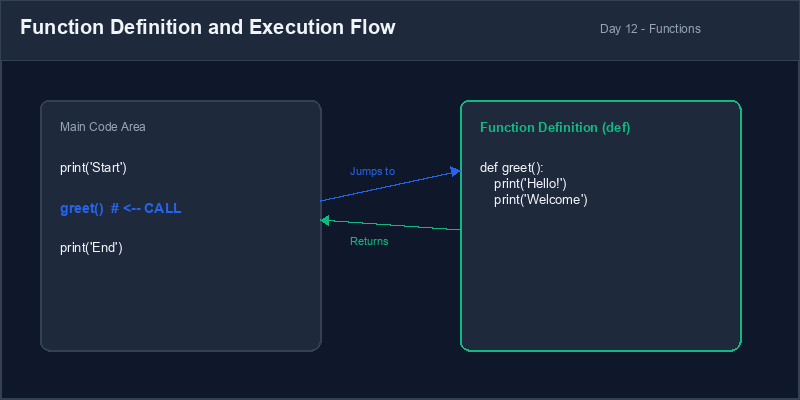
def keyword and
specifying its code block.Function Call: Initiating the execution of a defined function by invoking its name with parentheses.
2. Variable Scope: Local vs Global
Not all variables are accessible everywhere in your code. This visibility limit is called **scope**:
- Global Variables: Declared outside of any function. They can be read anywhere in your file, including inside functions.
- Local Variables: Declared inside a function. They only exist while the function is running, and cannot be accessed from outside the function.
message = "Global Text" # Global Variable

def check_scope():
    temp_var = 5 # Local Variable
    print(message) # Works! Can read global variables

check_scope()
# print(temp_var) # CRASHES! temp_var is local to check_scope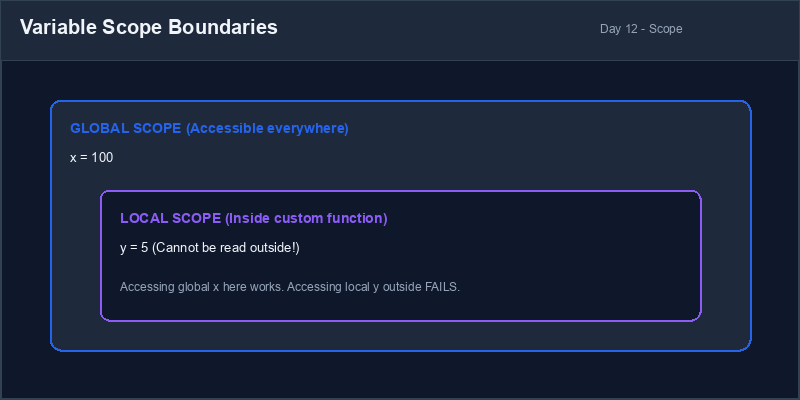
3. Benefits of Modular Programming
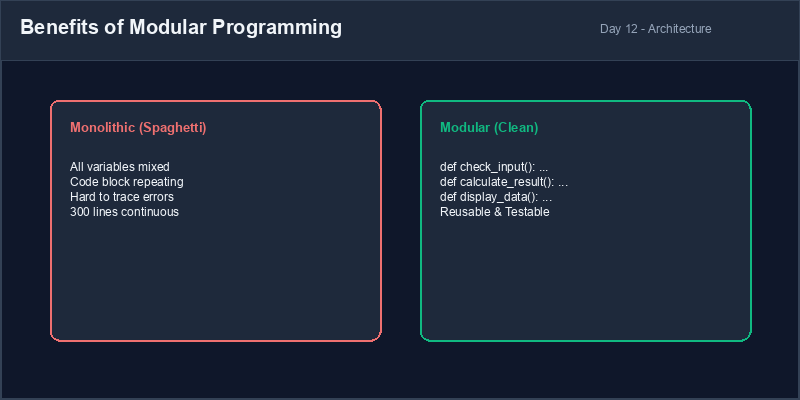
Dividing a large program into dedicated functions makes it **modular**. This approach simplifies debugging (you can test each function individually) and increases readability (code is organized into clear components rather than a single spaghetti monolithic script).
Name Collision Warning: Creating a local variable with the same name as a global variable will "shadow" the global variable inside the function. This can cause subtle bugs where you think you are changing a global variable but are actually modifying a temporary local one.
4. Troubleshooting Scope Crashes
Always declare variables in the appropriate scope and avoid attempting to read local variables in the global scope.
def setup_game():
    player_score = 100 # Local Variable

setup_game()
print(player_score) # CRASHES! NameError: player_score is not definedplayer_score = 0 # Global Variable
def update_game():
global player_score
player_score = 100 # Updates global variable
update_game()
print(player_score) # Safe! Prints 1001. تعريف وتشغيل الدوال البرمجية
مع زيادة حجم البرامج، تصبح كتابة الأكواد في ملف واحد طويل أمراً مربكاً وصعب الإدارة. نحل هذه المشكلة بتجميع كتل الأكواد ذات الصلة معاً وتسميتها بمسمى واحد يُدعى الدالة (Function). تسهم الدوال في إعادة استخدام الكود وتجعل البرنامج مجزءاً بشكل منظم.
نقوم بتعريف دالة باستخدام الكلمة المفتاحية def، يليه اسم الدالة وقوسين ()
ثم نقطتان رأسيتان. ويجب إزاحة الأكواد داخل الدالة للداخل. تعريف الدالة **لا يعني** تشغيلها. ولكي تعمل
الدالة، يجب علينا استدعاؤها صراحة بكتابة اسمها يليه القوسين.
# تعريف الدالة
def show_welcome():
    print("Welcome to Tech Zero!")
    print("Let's learn Python together.")

# استدعاء الدالة لتشغيلها
show_welcome() # ينتقل مفسر بايثون لتنفيذ الدالة ثم يعود لإكمال البرنامجdef وتحديد كتلة الكود التابعة لها.استدعاء الدالة (Function Call): إطلاق تشغيل دالة معرفة مسبقاً بكتابة اسمها مع الأقواس.
2. نطاق المتغيرات: المحلي مقابل العام
ليست جميع المتغيرات قابلة للوصول إليها من أي مكان في الكود. يُطلق على هذا القيد اسم نطاق المتغير (Scope):
- المتغيرات العامة (Global Variables): تُعلن خارج أي دالة. ويمكن قراءتها واستخدامها في أي مكان في الملف، بما في ذلك داخل الدوال.
- المتغيرات المحلية (Local Variables): تُعلن داخل دالة معينة. وهي موجودة فقط أثناء تشغيل الدالة، ولا يمكن الوصول إليها من خارج نطاق هذه الدالة.
message = "Global Text" # متغير عام

def check_scope():
    temp_var = 5 # متغير محلي
    print(message) # يعمل! يمكن قراءة المتغيرات العامة داخل الدوال

check_scope()
# print(temp_var) # خطأ! المتغير temp_var محلي خاص بالدالة فقط ولا يرى خارجها3. فوائد البرمجة الجزئية (Modular Programming)
تقسيم البرنامج الكبير إلى دوال مخصصة ومستقلة يجعله برنامجاً جزئياً. يسهل هذا الأسلوب عملية تصحيح الأخطاء (حيث يمكنك فحص كل دالة بمفردها) ويزيد من مقروئية الكود (حيث يتم ترتيب الكود في أجزاء واضحة بدلاً من كود واحد متشابك وعشوائي).
تداخل الأسماء (Shadowing): إنشاء متغير محلي بنفس اسم متغير عام سيحجب المتغير العام داخل الدالة. قد يسبب هذا أخطاء خفية حيث تعتقد أنك تعدل المتغير العام بينما تقوم بتعديل متغير محلي مؤقت.
4. إصلاح أخطاء نطاق المتغيرات
احرص دائماً على الإعلان عن المتغيرات في النطاق المناسب وتجنب محاولة استدعاء المتغيرات المحلية في النطاق العام.
def setup_game():
    player_score = 100 # متغير محلي

setup_game()
print(player_score) # يتوقف البرنامج! NameError: player_score is not definedplayer_score = 0 # متغير عام
def update_game():
global player_score
player_score = 100 # تحديث المتغير العام
update_game()
print(player_score) # يعمل بأمان! يطبع 100Bilingual Menu Coordinator منسق قائمة الاختيارات
Design a modular script that uses functions to display game instructions and menu options:
- Define a function named
show_instructions()that prints three rules of a game. - Define a function named
show_menu()that prints options like: "1. Start Game", "2. Show Rules", "3. Exit". - Write a main loop that calls
show_menu(), captures the user's choice:- If the user enters "2", call the
show_instructions()function. - If they enter "3", print "Goodbye!" and break the loop.
- If the user enters "2", call the
صمم برنامجاً جزئياً يستخدم الدوال لعرض تعليمات وقوائم خيارات اللعبة:
- عرف دالة باسم
show_instructions()تقوم بطباعة ثلاثة قوانين للعبة. - عرف دالة باسم
show_menu()تقوم بطباعة خيارات مثل: "1. بدء اللعبة" و "2. عرض القوانين" و "3. خروج". - اكتب حلقة تكرار رئيسية تستدعي
show_menu()وتستقبل خيار المستخدم:- إذا أدخل المستخدم "2"، فاستدعِ دالة القوانين
show_instructions(). - إذا أدخل "3"، فاطبع رسالة وداع واخرج من حلقة التكرار.
- إذا أدخل المستخدم "2"، فاستدعِ دالة القوانين
Model Answer (Python Code)
الإجابة النموذجية (كود بايثون)
# Step 1: Define modular functions
def show_instructions():
    print("
=== GAME RULES ===")
    print("1. Guess the secret numbers correctly.")
    print("2. Do not let your energy drop to 0.")
    print("3. Have fun learning Python!")

def show_menu():
    print("
--- MAIN MENU ---")
    print("1. Start Game")
    print("2. View Game Rules")
    print("3. Exit Program")

# Step 2: Implement main control loop using the functions
while True:
    show_menu()
    choice = input("Enter choice (1-3): ").strip()

    if choice == "1":
        print("Starting game... (Logic coming soon!)")
    elif choice == "2":
        # Call custom function
        show_instructions()
    elif choice == "3":
        print("Goodbye!")
        break
    else:
        print("Invalid Choice: Please choose 1, 2, or 3.")
Run the code above in your Thonny or VS Code IDE. Inspect variable outputs and logic flow to ensure it behaves exactly as described. قم بتشغيل الكود أعلاه في بيئة Thonny أو VS Code. تتبع مخرجات المتغيرات ومسار المنطق للتأكد من عمل الكود بالشكل الصحيح.